Category Archives: Database Administration Tasks
Corruption and Verifying Backups
This morning I had a conversation with a Subject Matter Expert and Application Administrator who asked me quite simply for a verified backup before he does an install on Saturday. My response was that I could test it manually for them and I was willing to do so but currently with our infrastructure the nightly backups are not tested without manual intervention. I have tried to change this policy for some time and unfortunately it may not occur until something bad happens. With this in mind, I do the best I can to minimize the risk given that I cannot automate a solution to restore databases on a regular basis as I would prefer. How can you minimize the risk?
- Use the WITH CHECKSUM option on your backup scripts. Read Paul Randall’s The Importance of Validating Backups article on SQL Server Central for more information.
- Use the RESTORE VERIFYONLY command (although we use Ola Hallengren’s Backup Solution which is the verify option which runs the command).
- Use the WITH CHECKSUM on the RESTORE command to recheck the page checksums in the backup as well as the backup file.
- Automate or manually restore your databases from scratch on a regular basis. (This is where we are lacking and where I want to take my servers).
- Once you have restored, then run DBCC CHECKDB against the restored database.
If you are not doing all five then you cannot say confidently that your backups are verified. However, if you are doing all five keep in mind that there is no fool proof guarantee against corruption, this merely minimizes the destruction by having viable backups. I hope this helps….Enjoy!
What’s New in SQL Server 2012
Since it is a holiday weekend, I thought I would give you something to chew on today. Having just installed SQL Server 2012 Developer on my personal laptop, I am wanting to test drive some new features. But what are they? Follow this link to MSDN to find out What’s New in SQL Server 2012.
I hope you are enjoying this long weekend, I know I am.
Exploring SQL Server 2012: Code Snippets
One of the new features available in SQL Server 2012 is the Code Snippet Manager. Previously this was available through third-party tools and add-ins. The Code Snippets Manager is available through the Tools menu, along with some other nice built-in tools as well for this release.
Here you can see that there are many nice built-in code snippets included off the shelf. The tool allows you to insert the XML formatted snippets (a la Visual Studio). Click here for information on how to create your own snippets from the MSDN. Personally I think the interface should have the functionality to just insert snippets of code like other add-in tools, however it is better than what we had previously off-the-shelf.

Figure 1 – Code Snippet Manager
This looks great but there is no insert button to put these snippets into my code, I tried. So how do I enter the code into the query editor as I type? Hold the control button (CTRL) and then press the K and then X to begin the insert, and yes I know this is an awkward key combination (what where they thinking). See figure 2 and choose a category of snippets.
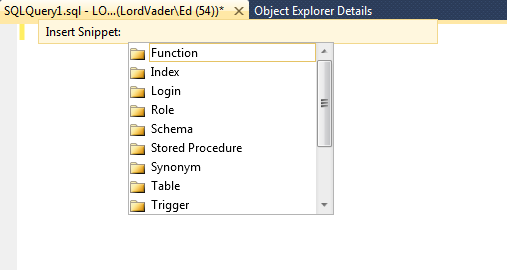
Figure 2 – Insert Snippet
After choosing a category then choose a snippet (see figure 3).
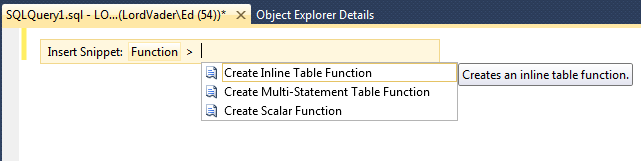
Figure 3 – Choose a Snippet
After choosing your snippet, it will be inserted into the query editor (see Figure 4). At this point you can customize the snippet to fit your code and you are done! Enjoy!

Figure 4 – The Finished Snippet
Updating SQL Server 2012 to SP1
With service pack 1 being released during SQL PASS Summit 2012, I did not get the chance to update my personal laptop. This is great timing as I have just purchased developer on my laptop. You can download the slipstream version or just the service pack separately. Are you curious as to what is new in SP1, then check this link out? It is also a good idea to read the release notes, which I always recommend but rarely do, unfortunately. It is similar to reading the directions, men rarely do that.
Here is the visual upgrade guide, quite simple really, so much so that even I can do it.
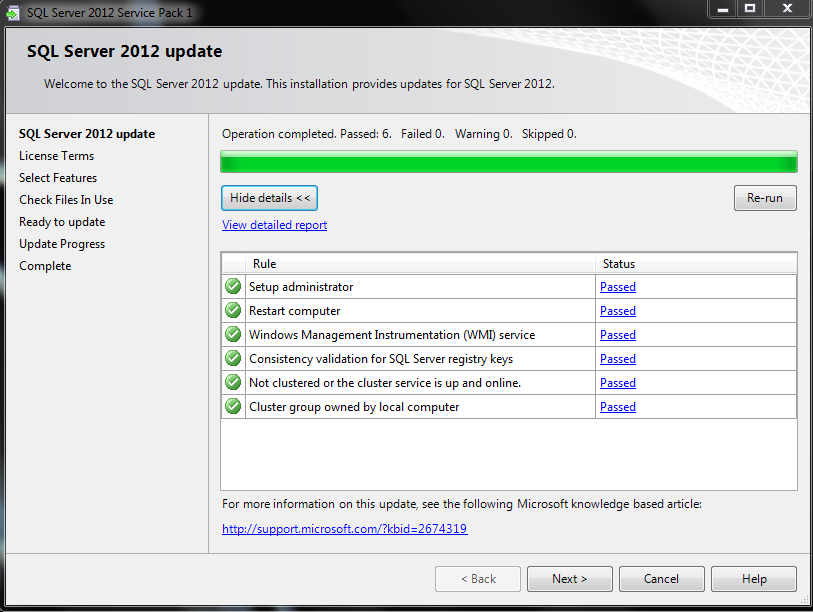

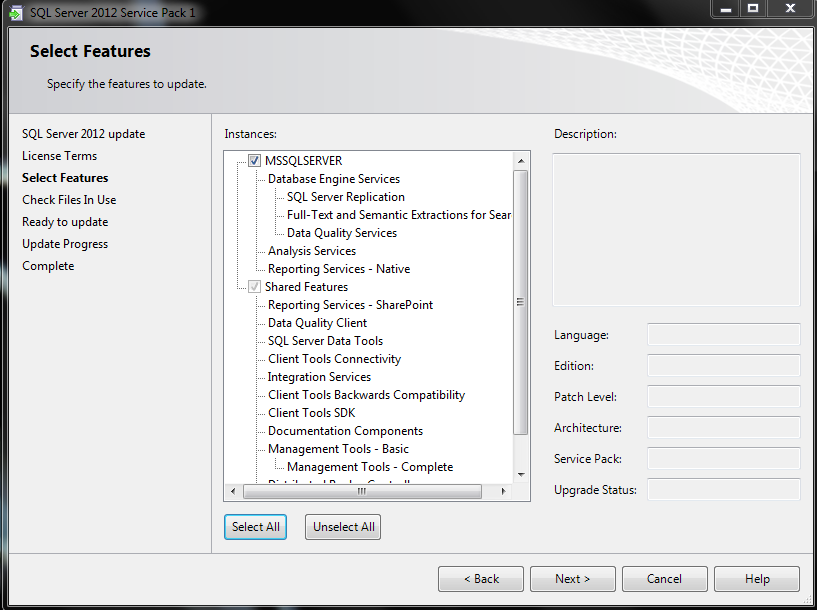
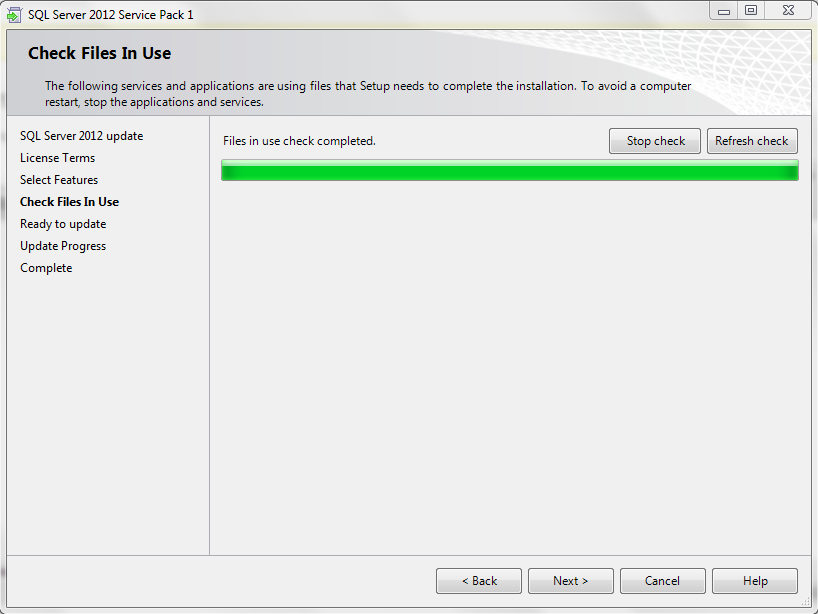


The update completed easily and successfully. Enjoy!
SQL Server 2012, Maybe?
On Wednesday of this week we spoke with Microsoft again about licensing for SQL Server 2012. Apparently there was some confusion when we had the discussion back in March with management’s understanding of how it worked. However, it still seems clear to me that reducing our Oracle footprint makes financially more sense.
In addition we are now being asked to prepare a proof of concept comparing the migration of ArcGIS SDE on Oracle currently to SQL Server or PostgreSQL. I will be building a machine with each and running some tests. Does anyone know any downsides to PostgreSQL compared to our beloved SQL Server that I can point out? Any suggestions would be greatly appreciated.
Nifty Code to Update Collation
Today, we interrupt our countdown series in progress to bring you some actual T-SQL coding. I had to bring out this snippet and dust it off for my purposes, to change some column-level collation in a database. To give you some background, we have a vendor product that requires case-insensitive collation at the server and table level, but case-sensitive on the column level. Yes, I know that is not best practices and seems like a weird design choice but I have to support it as the DBA.
Normally this would require a script from the vendor because it is their code, but the product allows you to create some custom tables (they default to the table level collation) in the database and those are our responsibility. So why would you need to change it you say? The developers were trying to write some reports against these tables and as you would expect they received an error (Msg 468, Level 16, State 9, Line 4 Cannot resolve the collation conflict between “SQL_Latin1_General_CP1_CS_AS” and “SQL_Latin1_General_CP1_CI_AS” in the equal to operation.) It would take forever to go table by table and column by column to change the collation, hence the need for the script!
DISCLAIMER: I have had this little snippet for a while and I do not know who wrote it originally, probably found on MSDN. I also know that it is not the most updated way of doing this (you should use the sys schema) but it works and sometimes that is easier than rewriting the code.
The first thing you should do is right-click on your query window in SSMS and set your results to text so that the script outputs you a new script that you will run in another query window. Keep in mind with some of your tables you might have to drop and recreate the indexes in order to alter the collation. Always take a backup before changing something like this and know what you are doing and changing before executing any script.
SELECT ‘ALTER TABLE ‘ + syso.name + ‘ ALTER COLUMN [‘ + sysc.name + ‘]’,
syst.name + ‘ (‘ ,
sysc.length ,
‘) COLLATE SQL_Latin1_General_CP1_CS_AS’ ,
CASE sysc.ISNULLABLE
WHEN ‘1’ THEN ‘NULL’
ELSE ‘NOT NULL’
END + CHAR(13) + CHAR(10) + ‘GO’
FROM sysobjects syso ,
syscolumns sysc ,
systypes syst
WHERE syso.id = sysc.id
AND syst.xtype = sysc.xtype
AND sysc.collation = ‘SQL_Latin1_General_CP1_CI_AS’
AND syso.type = ‘U’
AND syst.name != ‘text’
AND syso.name NOT IN ( ‘SYSDIAGRAMS’ )
Enjoy and I hope this helps you!
SQL Tool Evaluation, List of Tools
Thanks everyone for the feedback. Below are the items submitted thus far for me to evaluate, let me know within the next few days if you have any others to add to the list. Keep in mind that I am an Enterprise DBA, therefore I will not be evaluating any development tools.
- DBA xPress from Pragmatic Works
- SQL DBA Toolbelt from Redgate (we currently own)
- Ignite from Confio
- Performance Advisor for SQL Server from SQL Sentry
- SQL Server Index Analysis & Defrag from SQL Sentry
- SQL Diagnostic Manager from Idera
- SQL Admin Toolset from Idera
- Toad for SQL Server from Quest (we currently own)
- Foglight for SQL Server from Quest
- Spotlight on SQL Server from Quest (we currently own for Oracle)
- SQLCop from Less Than Dot.
Stay tuned for further details. I will have to process all of the EULAs and other paperwork in order to setup my test environment, but we have about five months left in order to complete this project. Enjoy!
I Want My MTV, I Mean SQL Server 2012!
I would love to upgrade my servers to SQL Server 2012. We’ve met with Microsoft and we discussed the licensing ramifications and I got really excited about upgrading after getting the OK internally. That was a couple of months ago. The one piece holding us up? Vendors!
We do have some SQL databases developed in-house, but being predominantly an Oracle shop, most of our SQL Server databases are vendor provided. We have set forth the initiative to do all new development solely in SQL Server for cost savings. Additionally, we have begun moving some of the vendor provided databases to SQL Server. However, those are also at the mercy of vendors. My latest project only supports SQL Server 2008, not even R2. This is very frustrating from an enterprise DBA standpoint. I want to move forward! Enjoy!
SQL Evaluation Project Upcoming
I have been tasked with an exciting goal for this new fiscal year. Determine whether our existing SQL Server tools, Redgate DBA/Backup Bundle and Toad for SQL Server, are the best tools for our needs. In other words, should we continue to pay for these tools or should we purchase different tools.
Before working for this employer, I have never been able to buy additional tools so I personally do not have any experience with any other tools. Therefore, frankly, I love the Redgate tools, but I do not know how well they stack up against tools from other vendors. Any input from my #SQLFamily would be greatly appreciated. Enjoy!
Keeping Track of Details
After creating a few new SQL accounts this morning, I thought I would share how I keep track of minor details like this. We use SharePoint for our department to track documents, procedures, processes, etc. This is a great place to track minute SQL Server details like accounts and databases. For example, we have over 280 databases across 32 servers. Some of the applications may have five or ten databases and I cannot keep 280 databases in my head as far as where they are, what application they are used for, who the business owner is, and if they are production, acceptance, or development.
I setup a SharePoint spreadsheet (ok its called a datasheet, but it is just a spreadsheet), for tracking SQL user name and passwords and of course I limit the access on this sheet, in case you were thinking about that. This is handy so that we do not have to reset them when the application administrator forgets it and wants to reset it and throw the application into turmoil. I also setup a datasheet to track the name, server and the business owner so I know who to contact when a server goes down, who to contact when I need to do maintenance, in addition to knowing where the database is when a user reports an issue. This is a great organizational tool, I hope it helps you.
Do you do this differently? Enjoy!


 SQL Swampland