Author Archives: SQLGator
SQLSat86 Session Review: Andy Warren’s ‘Building a Professional Development Plan’
The most popular blog post for 2012, enjoy!

Before we begin, I must first admit that when I saw ‘Building a Professional Development Plan’ in the SQL Saturday 85 Schedule in Orlando back in September, I was not enthusiastic about attending this session as I thought it was more for consultants or for those looking to start their own business. Quite simply, I was thinking business plan and not individual plan. In hindsight, I wish I had attended this session back then, but I digress.
As most everyone knows, Andy Warren is the father of SQL Saturday and his status in the SQL community is legendary. With that being said I will now list the things that I learned from this session.
- Generally we do not like setting goals as there is an inherit risk of failure.
- The professional development plan, or PDP, is essentially your business plan as you are essentially a business with a plan.
- The PDP…
View original post 322 more words
The second most popular blog post for 2012, enjoy!
 We take the term multitasking for granted these days. Everyone is multitasking all day long. We are checking our cell phones for e-mail while we are driving or in the restroom. We talk on the cell phone while driving or watching television. This has accelerated society to a break-neck speed. I am no different from anyone else as I used to take great pride in boasting in my ability to complete several tasks at the same time. Being a computer guy, it is only normal that I operate like my machines, multithreading!
However, it is at this stage in my career when I have realized the fallacy of this whole philosophy. Technically, it is not possible to multitask most operations unless one of those items does not require any active input. For example, talking while driving or walking and chewing gum. Driving for most of us has become automatic and only…
View original post 230 more words
Creating a Red Gate Backup Pro “Virtual Restore” Job Automatically (Part 9)
If you have been playing along at home this month then you know about some of the struggles that I have faced with automating the Red Gate Backup Pro automatically. Well, with the help of Red Gate and some rewriting of their provided script, I now have a script that will work automagically! When I say automagically, I mean that I want the script to run forever without any more interference from me in the same manner that our Ola Hallengren backup scripts work.
If you are not familiar, this tool is excellent for many reasons but one of the reasons that we like it is for the simple fact that if a new database is created, it will be maintained automagically. I do not have to create any maintenance plans or agent jobs each time I add a database to a server. We have several servers that get new small databases all the time and this is a time saver as well as a life saver. Now this scripts will do the same, it will iterate through the database names and restore the latest backup set as a new database with the name ‘_Restored’ tacked on the end of the existing name and place the data and log file in a separate directory to avoid overwriting your existing databases.
Do not worry about failure reporting with the job as Red Gate will send you an error for each database, pass or fail. If you wish to see only the failures then change ‘MAILTO’ to ‘MAILTO_ONERRORONLY’ in the script.
–This script will restore multiple databases where each database has it’s own Full Backup to be restored.
USE masterDECLARE @dbname NVARCHAR(260)
— Add any databases in that you want to exclude
DECLARE cdatabases CURSOR FOR
SELECT name
FROM sysdatabases
WHERE name != ‘tempdb’
AND name != ‘master’
AND name != ‘msdb’
–Set @restorepath to be the path of where your backups are located, in my example this is ‘D:\Backup\’
DECLARE @restorepath VARCHAR(500)
–@filename will need to be modified depending how the backup files are named
DECLARE @filename VARCHAR(500)
DECLARE @restorestring VARCHAR(1000)
–Not needed if running in a SQL job
DECLARE @exitcode INT
DECLARE @sqlerrorcode INTOPEN cdatabases
FETCH next FROM cdatabases INTO @dbname
WHILE @@FETCH_STATUS = 0
BEGIN
SET @restorepath = ‘D:\SQLVMDEV10\’ + @dbname + ‘\Full\’
— @filename will need to be modified depending how the backup files are named
SET @filename = @restorepath + ‘SQLVMDEV10_’ + @dbname + ‘_FULL_*.sqb’
SET @restorestring = ‘-SQL “RESTORE DATABASE [‘ + @dbname + ‘_Restored] FROM DISK = ”’ + @filename
+ ”’ SOURCE = ”’ + @dbname + ”’ LATEST_FULL WITH MAILTO = ”ed@sqlgator.com”, RECOVERY, DISCONNECT_EXISTING, MOVE DATAFILES TO ”G:\VirtualRestore”, MOVE LOGFILES TO ”G:\VirtualRestore”, REPLACE, ORPHAN_CHECK, CHECKDB = ”ALL_ERRORMSGS, DATA_PURITY, EXTENDED_LOGICAL_CHECKS”, DROPDB” -E’
–If you wish to apply additional backup, remember to change the WITH RECOVERY to WITH NORECOVERY,
EXEC master..Sqlbackup
@restorestring,
@exitcode output,
@sqlerrorcode output–IF (@exitcode <>0) OR (@sqlerrorcode <> 0)
— BEGIN
— RAISERROR (‘SQL Backup job failed with exitcode: %d SQL error code: %d’, 16, 1, @exitcode, @sqlerrorcode)
— END
FETCH next FROM cdatabases INTO @dbname
ENDCLOSE cdatabases
DEALLOCATE cdatabases
This will generate multiple entries in Red Gate Monitor, as mentioned in Part 4 of our journey. In order to prevent these setup a maintenance window on your monitoring tool and run this script only during the maintenance window ensuring that no other jobs run during that time so that you do not miss any important alerts from those maintenance jobs. Here is a link from Red Gate detailing how to set the maintenance windows in Monitor. Enjoy!
Migrating SQL Server Database Logins with sp_help_revlogin
The third most popular blog post for 2012! Enjoy!
You’ve migrated your database to a new box, with no problems. You created the login that goes with this database, and all is right in the world. However, when your user goes to connect to it they get the dreaded error 18456, login failed. But wait, I created the login, right?
Not so fast there, accidental DBA. You are going to need the help of a nifty stored procedure called sp_help_revlogin. This stored procedure, provided by Microsoft in the link below, will generate a T-SQL script that will copy the logins, their passwords and their corresponding SIDs (or security identification number, which is usually the culprit here). This is also a great utility when the database has numerous users with various security levels and passwords. Really now, who wants to write all of that down and recreate it? Even with screenshots, it can turn into a large, fat-fingering and time consuming event. …
View original post 70 more words
Personal Development Plan Part Dos….
The fourth most popular post from 2012 on SQLGator.com
Having posted yesterday about my Personal Development Plan, I read a blog post from Neil Hambly regarding his 2012 goals. Now, I realize that my goals were somewhat vague and easy to worm out of. Here are the goals that I had mentioned yesterday:
- I want to dedicate time everyday to this blog and giving back to the SQL community that has helped me so much over the years.
- I want to continue to dedicate time to the SQL community in social media.
- I want to attend at least ten events this year consisting of SQL Saturdays, training, code camps, and possible SQL Rally and/or SQL PASS.
Let’s revise those goals to the following:
- I will post daily to this blog in order to give back to the SQL community that has helped me so much over the years.
- I will spend time daily helping people on twitter, SQL blogs…
View original post 453 more words
SQL Nexus, Read Trace Errors Resolved!
The fifth most popular blog post for 2012!
Last Monday we started our SQL Nexus journey together in order for me to refresh my knowledge of this awesome tool. Near the end of last week, the blog series was delayed due to an error with the ReadTrace and its corresponding report. Yesterday and again today, I am troubleshooting our attempt to resume our journey but with little hope for correcting the error. I have posted the error on CodePlex and am awaiting a response.
Yesterday, I referenced a “ReadTrace exit code: -2” error in the ReadTrace log file. I did find one page out there on SQL Server Central where Grant Fritchey (Twitter | Blog) had encountered the problem. After contacting, Grant he told me that the problem that he had was a simple one, he did not have the file and path name correct which corresponded with the file not found error higher up in the ReadTrace log. However, when cutting…
View original post 251 more words
Red Gate Backup Restore of the Master Database (Part 8)
One of the errors I encountered with the Red Gate Backup Pro tools discussed extensively this month, was in running the DBCC CHECKDB command on a temporarily restored backup. It gave errors about the consistency which did not appear in the actual master database. The following are some interesting blog articles in response to this issue:
- Response from Red Gate.
- Response from Paul Randal and Kimberly Tripp on SQL Server Pro magazine.
Basically you will need to do the master database separately. I run an integrity check weekly against the system databases. It is a good idea to follow the recommendations from Red Gate listed in the link above. Enjoy!
Day Off
Today begins my six-day holiday, the blog will return to its hard-core SQL action after Christmas. Enjoy!
Public Speaking
With the deadline to submit a presentation for SQL Saturday Tampa looming over the next two weeks, I am faced with a dilemma. Do I scrap my previous presentation and start over or come up with another presentation? I was not overly satisfied nor happy with my new presentation in Orlando back in October. I was happy with my presentation in Pensacola in June, however. I have a few ideas for some new presentations, but I think I might try those out at the user group level first. Now that I think about it, I may just fine tune my current presentation and work out the kinks. Thanks for listening while I worked this out in my head. You are the best listener.
In addition, Thomas Larock (b|t) tweeted a link this morning about the 12 Most Deadly Public Speaking Sins, check it out if you are thinking about speaking. Please register for SQL Saturday Tampa to be held on March 2, 2013. See you there!
Red Gate Backup Pro Continued (Part 7)
If you have been keeping score at home, I have been trying to work out the issues of implementing the Red Gate SQL Backup Pro and Virtual Restore. This series may sound like a bunch of complaints, they are not. I am just working through the issues and hoping to help others struggling and hopefully improve the product if possible. If some of these items are easily fixed, I could not find the information easily on their website otherwise I would not have posted it. Or it could be quite possibly that I am just an idiot.
I was able to resolve one issue from yesterday post, the weekly regular SQL Server copy-only backup. By tweaking the HyperBac Configuration Manager settings for the BAK extension and disabling HyperBac compression (see Figure 1) we were able to get default SQL Server backups running once a week in the midst of using SQL Server Backup Pro for our daily backups.
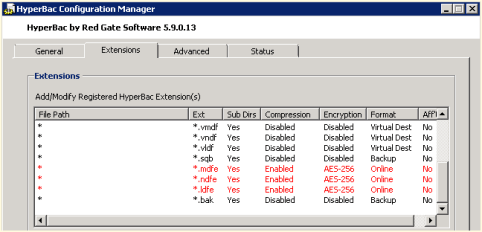
Figure 1 – HyperBac Configuration Manager
We also noticed a weird error in our SQL Monitor tool when using the Virtual Restore (see Figure 2). The drive is only 300 GB where we store our Virtual Restores. It looks like the Virtual Restores raise a drive space error based upon the “actual” size of the restore instead of the virtual size.

Figure 2 – Drive Space Error in SQL Monitor
Just in case you are wondering, I compiled my long list of quirks and submitted it to Red Gate support. I am confident that they will be able to help as they have been excellent in the past. Personally, I just like to figure things out before I talk with support, which many probably find as a character flaw. Maybe it is male ego or pride but I like to solve problems without help if at all possible. On the other hand, I am never afraid to ask for help, I just want to make sure I have tried everything before hand. Enjoy.


 SQL Swampland