Category Archives: Training
Saturday SQL Schoolhouse, Case Studies

SQL Schoolhouse!
Today’s installment of the Saturday SQL Schoolhouse is brought to you by the fine folks over at Microsoft. When searching for a topic to “teach” today in the schoolhouse, I came across this site called Microsoft Case Studies and could not stop reading. Obviously, it makes perfect sense for Microsoft to create such a page to help business see the correlation between their products and solving the problems that they have.
Being a SQL geek, I was enthralled like when you are reading a good spy novel wondering if the migration was successful, did the BI solution solve their reporting quandary, did the cloud really save them millions in unnecessary overhead. Forget the kindle, pick up a good case study and it may help you solve a problem you are having in your office. Enjoy!
PASS Summit 2012…Last Week to Save $700
Have you registered for PASS Summit? This week is the last week to register at the second stage early bird rate.
Do I have a financial interest in the Summit? No.
Do I want to see you there? Heck yeah!
Am I sure that I am going? Not yet, still waiting on approval by my employer. It is a weird tight rope I am walking at this stage, do I pay my own way and save the $700 or do I wait in hopes that they will fund it?
Have I been before? No, not yet.
Have I wanted to? Heck yeah!
What will I do if my employer says no? Stand on the street corner with a sign that signs will administer your databases for a trip to the Summit. Am I serious? You bet. Ok, maybe this winter when it is not 100 degrees outside. Seriously if they say no, I will pay the $999 early bird and pay my own way and drive to Charlotte. Let’s hope I can meet you there, but only if you register for PASS Summit 2012. Enjoy!
SQL Reference Book Favorites

Books That Remain On My Desk
While looking up something in the racecar book, I thought the topic would make a great blog post. What books stay on your desk? I have a book shelf full of wonderful books that are written by people smarter than me. However, there are four books that never return back to the book shelf mainly because they are my “go to” books of choice. They rarely fail me in my time of need. The first being my training manual for the SQLskills Immersion Event for Internals and Performance (aka IE1). If you have taken this class, then you understand why this never leaves my desk. The second manual is affectionately called the racecar book. It is the actually called Professional SQL Server 2008 Internals and Troubleshooting and is the first book that I open when I have a question. The third book is a new book called Troubleshooting SQL Server, A Guide for the Accidental DBA. I am currently reading this book, but I think it will stay on my desk for some time to come. The final book is Pro SQL Server 2008 Failover Clustering because I have yet to see another book for clustering that covers everything under the sun. Now don’t get me wrong, eBooks are great, but it still does not beat a real book, maybe I am just old school. What books remain on your desk?
Saturday SQL Schoolhouse, MS TechEd
SQL Schoolhouse!
Today’s installment of the Saturday SQL Schoolhouse is brought to you by the fine folks over at Microsoft TechEd which was held last week in Orlando. Didn’t get to go to TechEd this year, me either. But that’s fine because we have the next best thing though, all of the sessions online! Top Rated Sessions at TechEd North America 2012.
Enjoy!
Final Thought from SQL Saturday Pensacola Pre-Con
For my final blog about SQL Saturday #132, I wanted to leave you with one all-encompassing piece of advice that I received from the pre-conference training on Friday prior to the event. The pre-con titled “Demystifying Database Administration Best Practices” was presented by Microsoft Certified Masters Robert Davis (twitter|blog) and Argenis Fernandez (twitter|blog).
Of course, I will preface this advice with the fact that I am passionate about Best Practices and I also love using the Best Practice Analyzer from Microsoft to detect new violations of best practices. It is great to run on an instance when I am in a hurry and do not have time to go through a check list. I simply want to see if any new changes have been made since the last time I ran the tool also known as has anyone changed anything on the server without my knowledge. With that being said, I give you the advice.
“Do not always rely or trust the information from Best Practice Analyzer”
I do not remember if Robert or Argenis said this pearl and it really doesn’t matter because it is great advice for you and me. Do not mistake all of my previous posts on the BPA as gospel. It is a great tool, but it is an automated solution. It simply cannot know all of the specifics of your server, applications and environments. Hopefully you do!
This is the reason that you can choose to disregard some items so that you never see them again. I personally do not like doing that because if something changes in my department then I forgot all about the warning because I disregarded. If I see it is a warning then I know it is still there but there is nothing I can do about it.
Mixed mode authentication is a great example. We have to run it on some servers because of vendor applications but we are not happy about it. This will trigger a warning every time, but I do not disregard it because at some point that may change.
Have a great weekend and enjoy!
Green? If You Only Knew the Power of the Dark Side!
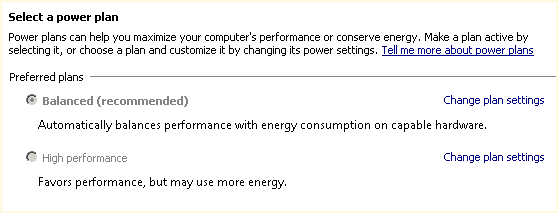
Default Server Power Plan
Continuing my blog series from SQL Saturday #132, I wanted to review one piece of good advice I received from the pre-conference training on Friday prior to the event. The pre-con titled “Demystifying Database Administration Best Practices” was presented by Microsoft Certified Masters Robert Davis (twitter|blog) and Argenis Fernandez (twitter|blog).
The default power setting for a new server is balanced as shown in the image above. This is great when you are trying to achieve a green workplace. But did you realize that you purchased hardware and now you are not using it to its full power? Why would you purchase a powerful server and then not use the server to its full capacity? Why not just buy a less powerful server if that is the goal?
Want to see the difference in the balance power plan and the high performance? Download the freeware CPU-Z utility from CPUID. This is a great utility for the administrator for more reasons than just this one as it gives realtime analysis for your CPU, memory, and graphics.
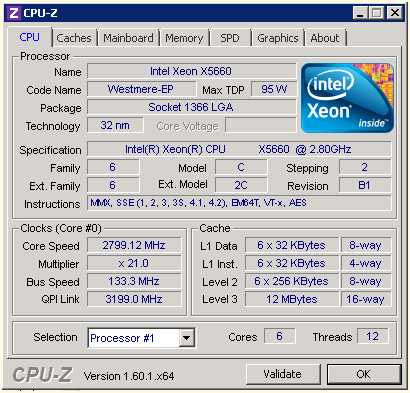
CPU Performance with Balance Power Plan

Check your servers, you may be running short on some power. Stay tuned for more items in our next installment. Enjoy!


 SQL Swampland