Category Archives: Database Administration Tasks
SQL Nexus, Read Trace Errors
Last Monday we started our SQL Nexus journey together in order for me to refresh my knowledge of this awesome tool. Near the end of last week, the blog series was delayed due to an error with the ReadTrace and its corresponding report. Today, I am still attempting to resume our journey but with little hope for correcting the error. I have posted the error on CodePlex and am awaiting a response.
The first error I received when loading the trace files in was error 26 which many people translated into a permissions problem on the trace file. I resolved that issue by granting full control to my admin login and SQL Server when that did not resolve the issue. Now I am receiving a “ReadTrace exit code: -2” error in the ReadTrace log file.
At this point, I can find no helpful information on the interwebs. I do find it interesting the that log file also denotes that it cannot find the trace file that it is trying to load, however when I cut and paste the file in question right from the log file it opens in notepad so I am not sure that the error is entirely accurate. I checked the permissions on the trace file and it is consistent with the other files. I’m stumped.
Has anyone else seen this?
SQL Nexus, Delayed with Error
I was hoping to continue our series today but I am running into an error while loading the trace files. I have spent the day with other production issues and have been unable to track down this error with ReadTrace. I hope to be able to blog about it next week. Stay tuned and enjoy your weekend.
SQL Nexus, Data Collection
Monday we started our SQL Nexus journey together in order for me to refresh my knowledge of how to use this awesome tool. On Tuesday, we installed some essential pieces in order to get the SQL Nexus tool installed and ready to use. We detoured on Wednesday to attend the SQL Server 2012 Technology Days at Microsoft in Tampa. Today we return to the fun, so let’s jump right back in!
I realized this morning that I left out another download, the SQL Server 2005/2008 Performance Statistics collection scripts. This has the XML configurations needed to run SQLDiag in order to load performance data into SQL Nexus. Well let me qualify that, these XML files are pre-configured and they can be modified if necessary. These configurations will capture DMVs and also blocking information that can help you troubleshoot performance problems. It will also collect machine information from Perfmon, msinfo32, various event logs, and the profiler trace (unless you run the NoTrace command script). There is more detailed information on customization available on the CodePlex download page (make sure you read the fine print about the download location as it is not the big download button on the right).
Once you run one of the scripts, such as StartSQLDiagDetailed_Trace2008R2.cmd, you will see several lines of preparatory messages followed by “SQLDIAG Collection started. Press Ctrl+C to stop.” At this point you can reproduce your issue, if possible. If not possible, then collect data for a few minutes and then press Ctrl+C to finish the collection and generate the output necessary for SQL Nexus. Be vigilant of running this as the output can grow very large very quickly especially if you running this against a production server. Be careful! Once the dialog closes, then the output is ready to load into SQL Nexus.
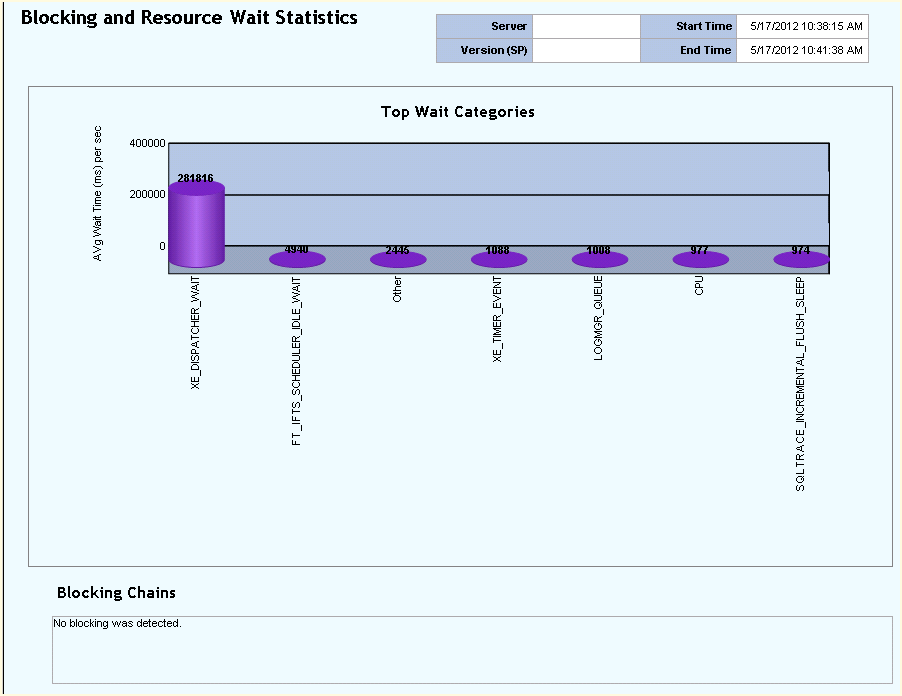
Now open SQL Nexus and we can import the data that is output from SQLDiag from the output folder that is generated underneath the folder where you ran the script from, by default. From there we can run some of the reports located on the upper left corner of the interface. Not all of them will apply depending upon what data you collected and which script ran. Below is a sample of the Blocking and Wait Statistics report. This was just a sample ran for this blog, so unfortunately I did not having any blocking issues to show you. I hope this helps your understanding of SQL Nexus. Enjoy!
Technology Days, SQL Server 2012
We interrupt my learning series on SQL Nexus to bring you my blog live from SQL Server 2012 Technology Days here at Microsoft Tampa with David Pless, Sr Premier Field Engineer.
If you are reading my blog regularly then you know all about my love for SQL Server learning, so obviously I had to attend this event. So far I have learned a few things to make this outing worth the drive for me. Oh who am I kidding, this is SQL Server training that in itself was worth the drive and a day out of the office.
Here are some things that I have learned today:
1. Server Core for 2012 is amazing and I am ready to deploy it when I return to the office!
2. PowerShell for 2012 will add functionality that makes it more attractive than the current GUI tools.
3. PowerShell is not the horrible tool that I thought it was….there is no reason for me not to use it more to be more efficient.
The day is not over yet so maybe there is still more awesomeness to come! Enjoy!
SQL Nexus, Getting Started
Yesterday, we started a journey of knowledge refresh with the SQL Nexus tool available from CodePlex. Before we begin, it should be noted that this tool has not yet been updated to include SQL 2012, sorry, but it does cover databases from 2000 through 2008 R2. For clarification purposes, it does require at least the SQL Server 2005 database engine but will analyze SQL Server 2000 databases (at least it says that it does, but I do not have any to run it against so I cannot comment on the validity).
You will also need a few other items such as the Microsoft Report Viewer, (2008 or 2010 versions will work), you will need to update the Report Viewer (2008 or 2010 versions), install the Relay Markup Language Utilities (RML Utiltities), and then you will be able to install SQL Nexus. That almost felt like a Linux distribution with all of the required pieces.
The RML Utilities are pretty neat as they can help simulate application testing by replaying a production user load in a testing environment. This can be helpful in testing an upgrade to SQL Server or in applying patches and service packs. Tomorrow we will continue this journey. Enjoy!
SQL Nexus, an Introduction
Have you tried SQL Nexus yet? SQL Nexus allows you to import data from SQLDiag/PSSDiag, PerfMon, and PerfStats into a special database where you can then generate reports detailing performance issues based upon the imported data. Over the next couple of days, I will blog about using this tool as well as the SQLDiag/PSSDiag Manager tool. I have used these tools only a couple of times and need to refresh my knowledge, so feel free to come along for the journey. Enjoy!
Vendor Crap
Breaking from the week-long geek fest, I felt I needed to rant somewhat about vendor provided databases. Working in my environment, the majority of SQL Server databases are vendor provided. We have a few in-house applications but most of those are on our Oracle infrastructure, for now (insert evil laugh).
More often than not it has been my experience that vendors do not understand security and common accepted best practices for SQL Server not to mention the provided installation documentation is usually horrid. It is not too much to ask for vendors to understand the database environment in which they deploy. I am thoroughly frustrated after trying to install a database today from a vendor who after several phone conversations I began to realize that they do not understand how certain aspects of SQL Server work and that scares me thoroughly! End of rant, enjoy!
Want to See What’s New in SQL Server 2012?
When discussing SQL Server 2012 in the workplace, I have been asked several times for a summary of the new features as I am sure you have as well. Want to find a good source to quote for your answers? Well look no further: What’s New in SQL Server 2012 (en-US) – TechNet Articles – United States (English) – TechNet Wiki.
Enjoy!
Microsoft SQL Server 2012 Best Practices Analyzer Is Now Available for Download
As many of you know already, I am very passionate about best practices. Thus, it is with great pleasure that I announce that the Best Practice Analyzer for SQL Server 2012 is now available for download (see link below). You will need the Microsoft Baseline Configuration Analyzer (MBCA) version 2.0 and PowerShell 2.0 installed in order to use this BPA. See my previous blog post on how to install the MBCA. Enjoy!
Sometimes It’s Best Not To Monkey Around
Recently I found a poorly performing server and I could not figure out why with all of the usual troubleshooting techniques. Something told me to look at some of the configuration settings and there it was shining like a crazy diamond. The sp_configure option ‘max worker threads’ was set to a value of 16. Seriously?
Now my curiosity was piqued. There are experts who change settings like this because they know what they are doing. Generally, I do not monkey around with these types of settings unless I have a really good reason to do so, and no a vendor telling me to do it is not a good reason unless this SQL Server is dedicated solely to them, which it is not! Best practices says to leave this at zero so that SQL Server can manage the number of worker threads for optimal performance. Who am I to think that I know better than some really smart guys from Redmond? After doing some light reading on the subject, I learned that too few threads can cause “thread starvation” where there are not enough threads to service the incoming client requests resulting in poor performance.
In addition, setting this value too high can waste memory and also be detrimental to performance. In conclusion, do not monkey around with the settings unless you know what you are doing. That is all!
Enjoy!


 SQL Swampland