Category Archives: Maintenance
Keeping Track of Details
After creating a few new SQL accounts this morning, I thought I would share how I keep track of minor details like this. We use SharePoint for our department to track documents, procedures, processes, etc. This is a great place to track minute SQL Server details like accounts and databases. For example, we have over 280 databases across 32 servers. Some of the applications may have five or ten databases and I cannot keep 280 databases in my head as far as where they are, what application they are used for, who the business owner is, and if they are production, acceptance, or development.
I setup a SharePoint spreadsheet (ok its called a datasheet, but it is just a spreadsheet), for tracking SQL user name and passwords and of course I limit the access on this sheet, in case you were thinking about that. This is handy so that we do not have to reset them when the application administrator forgets it and wants to reset it and throw the application into turmoil. I also setup a datasheet to track the name, server and the business owner so I know who to contact when a server goes down, who to contact when I need to do maintenance, in addition to knowing where the database is when a user reports an issue. This is a great organizational tool, I hope it helps you.
Do you do this differently? Enjoy!
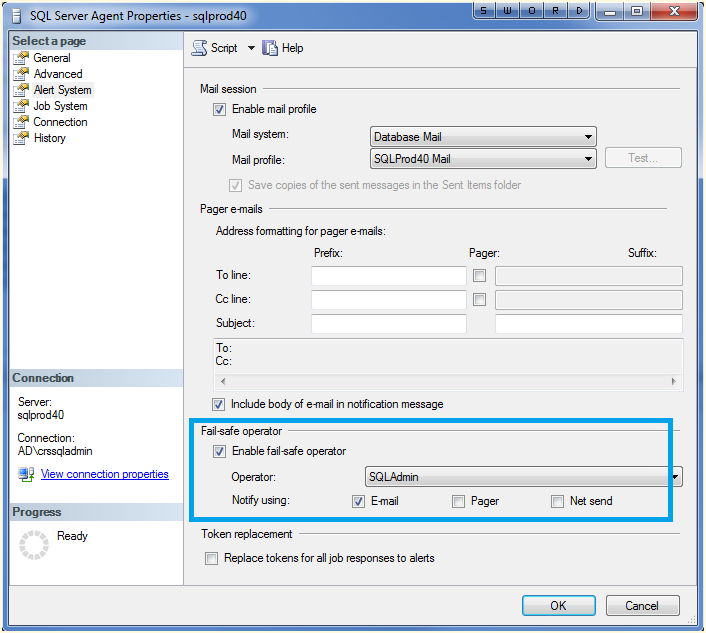
Fail-Safe Operator
Everyone needs a backup plan including the SQL Server notifications. If something goes awry with the notifications or the msdb database is unreachable, then the fail-safe operator will ensure that mail is delivered.
Select properties on the SQL Server agent (from the object explorer) in order to enable it for your instance. Enjoy!
Outlook Rules Are Your Friend
 If you are like me, you receive quite a bit of automated e-mails from all of your SQL Server jobs and maintenance plans. This can take a fair amount of time to read these e-mails daily. Until now!
Outlook rules and alerts are a great way to manage this workload. First of all, and most importantly, use a unique description in the Notify Operator Task for maintenance plan notifications, such as Figure 1. Be consistent! Use this same string in all of your backup tasks in your maintenance plans.

Figure 1
Then create a rule in Outlook (Tools -> Rules and Alerts -> New Rule) to handle these messages. Personally, I set them to move to another folder to keep them organized, look for specific words in the body (the phrase we put consistently in our notification tasks), and make sure they come from the e-mail account that I setup to alert me from all of my servers (as shown in Figure 2).

Figure 2
From here, let the fun begin as I then do the following (see Figure 3):
- Mark them as high importance
- Flag the message for follow-up today
- Move it to the specified folder (I know we did this on the last step, but it is highlighted on this step as well, silly Outlook)
- Display a specific message, Database Backup has FAILED, in the New Item Alert window to ensure that I see it as it happens (granted most jobs are at night, but it will be there waiting for me in the morning)
- Display a Desktop Alert (can you tell that this is a big deal?)

Figure 3
From here you can name the rule and finish the task. I also like to setup a rule for successful jobs that searches for a successful string that I have designated, but in that case I mark the e-mail as read and move it to the folder in case I need to search for it later.
For SQL Server Agent jobs, you have to do things just a little bit different since you cannot set a custom string for the alert message. In that case, search for “STATUS: Succeeded” (or failed, if that is the case) in the body of the e-mail and setup your other options in the same manner.
Outlook Rules are your friend, use them to be more productive. Enjoy!
Cooperation is Key
We have a morning “production control” meeting daily where key people report on the status of their systems as well as announcing approved change management items. Most days this is an exercise in repetition but it is necessary in order for administrators to announce changes to their systems that might affect other connected systems. For me, bringing down one of my SQL Servers can have a far out reaching effect upon many other systems.
For example, we have one particular server that houses all of the databases for our internal IT systems, such as VMWare Virtual Center and Citrix and a few smaller ones such as Blackberry Enterprise Server. This is a beefy server to power our infrastructure, however it is a major hassle every time I need to do some maintenance on it. Yes we have maintenance windows. However, for many of these systems the particular admin has to intervene before I can take their particular database offline. The usual cry is that “hey you cannot take that down on that day because I have X job running” where I say “no problem, how about tomorrow?” Then someone else chimes in with “no good, I have this process that runs on that day.”
My solution? Setup a meeting and coordinate the maintenance, which will happen come hell or high water. Cooperation is key. The database server must be patched and maintained, but without cooperation many other systems will suffer.
Enjoy!
Getting to Know sp_helpuser
 The stored procedure, sp_helpuser, is useful in showing various information about the users such as login name, default database, default schema and the SID. You can also see if a user name is aliased. I hope you find this useful. Enjoy!
Master Maintenance Plan, Part One
For the last two days, in between other tasks, I have been kicking around ideas to organize or reorganize scheduled jobs and maintenance plans into a grander scheme solution that sends me ONE e-mail a day. Sounds like a minor operation, but I have 32 SQL servers including four clusters. Currently, many of the 300 databases send me nightly e-mails to let me know whether the individual operations succeeded or failed. There are still some maintenance plans that I have not replaced yet. I have also implemented Ola Hallengren’s backup solution on many of the servers which greatly reduced the number of e-mails that I receive. The plan is to install that solution on every server. This solution has saved me hours upon hours of work, check it out if you have not already.
Sometime ago, I wrote or found a script (no, I cannot remember) that would send me an e-mail letting me know the backup type and date/time of the last backup. So here we are, and I am trying to take this to another level by exploring solutions to greatly reduce e-mail traffic and reduce the amount of time it takes me to assess my server’s overnight maintenance thus allowing me to spend more time being proactive. With all that being said, I found the following article, Use PowerShell to Report SQL Server Backup Status, written on the Hey, Scripting Guy! Blog.
As this plan develops, I will post new blog posts. Enjoy or let me know how you handle it. Let’s share ideas!
Database Tracking
This morning one of our VMWare clusters went down when our SAN guys inadvertently unplugged the wrong storage array. Oops! We had to reboot some of our development and test servers including my SQL Servers. No big deal, this happens from time to time.
Good manners dictate that I notify the effected application administrators so they don’t panic seeing their connections drop. This is a pretty normal procedure. In my previous positions I had at the most five servers and I knew every database and who it belonged to. However, in this environment, I have almost 300 databases and knowing what they go to and who to contact is handled by a spreadsheet that was created before I started. Seems like there should be a better way to track this and to notify me when new databases are created. How are you handling this task?
Common Request from Vendor
These days it seems that I am getting more and more requests like this one:
Can you please backup XYZ database and then run the following command, UPDATE XYZtable.column SET FIELD=’somevalue’ WHERE KeyField = ‘value’?
Mind you, that XYZ database is a production database with a legitimate development and/or acceptance counterpart depending upon the importance of the data. Here is my usual response:
Sure. I would be happy to run that for you in the DEVELOPMENT environment. <Pause> What do you mean production is down and this needs to go straight to production? <Pause> So who changed this value to cause your application to go down? <Pause> The vendor says this happens all the time with the application? And this is the fix?
Unfortunately, these types of requests seem to be more common place when dealing with vendor databases, at lease in my environment. Having been a developer in a previous lifetime, this really bothers me. We called that a patch, where the vendor fixes the application to stop causing the problem especially when data was involved. Fix the problem, not the symptoms people. Enjoy!
Color Coding SSMS
Finally got around to color coding my SQL Server Management Studio (2008) on my desktop today, which is a great feature if you haven’t set it up already. Essentially it changes the color at the bottom of your query window which is usually a light yellow. Why bother?
Well for me I set my production boxes to red, acceptance boxes to yellow, and development boxes to green to remind my brain whether it is safe to make changes to the environment. Once you have a few query windows open, you tend to forget to which environment that window belongs to. This is not foolproof, but it is a handy reminder to be mindful of your environment.
Not sure how to set it up?
Well using the registered servers feature, add your server and select the properties. Then choose the connection properties tab and select the ‘use custom color’ option and then press select to choose your color. Easy and remember to restart SSMS for this to take effect. Enjoy.
SQLChicken’s New Tool
Preparing to blog, I saw a new blog post by Jorge Segarra (blog | twitter) that will identify and alert you when you have long-running alert jobs. This is something that I have had on my list to sit down and write when I found some extra time (translation: never going to happen any time soon). I was so excited, I thought I would pass it on to you before I even played with it myself. The life of a DBA sometimes does include doing the happy dance when you see something totally cool. Enjoy!


 SQL Swampland