Author Archives: SQLGator
And so it begins…..
After attending SQLAndy’s SQL Saturday session on “Building a Professional Development Plan” a couple of months ago, I have been determined to develop my own Professional Development Plan. Over the next week or so, I will be formulating this plan here on this blog. At this point, I have a few goals for 2012 to begin the discussion.
- I want to dedicate time everyday to this blog and giving back to the SQL community that has helped me so much over the years.
- I want to continue to dedicate time to the SQL community in social media.
- I want to attend at least ten events this year consisting of SQL Saturdays, training, code camps, and possible SQL Rally and/or SQL PASS.
Stay tuned as we formulate this plan….
Migrating SQL Server Database Logins with sp_help_revlogin
You’ve migrated your database to a new box, with no problems. You created the login that goes with this database, and all is right in the world. However, when your user goes to connect to it they get the dreaded error 18456, login failed. But wait, I created the login, right?
Not so fast there, accidental DBA. You are going to need the help of a nifty stored procedure called sp_help_revlogin. This stored procedure, provided by Microsoft in the link below, will generate a T-SQL script that will copy the logins, their passwords and their corresponding SIDs (or security identification number, which is usually the culprit here). This is also a great utility when the database has numerous users with various security levels and passwords. Really now, who wants to write all of that down and recreate it? Even with screenshots, it can turn into a large, fat-fingering and time consuming event. Mind-numbing, I would say. Why do something manually when you can do it automagically? Just think of all those happy logins that will not be orphaned by the dark side?
Here is also a code snippet to check for orphaned logins, for your enjoyment. Enjoy!
USE <database_name>;
GO
sp_change_users_login @Action='Report';
GO
Merry Christmas Everyone!
I would like to personally wish you and your family a safe and Merry Christmas and a Happy New Year. I hope 2012 is especially productive and that we all have a very #SQLAwesomeness year! I look forward to seeing you all at various SQL events in the new year! I would also like to thank everyone in the SQL Community for everything you do throughout the year to help spread the SQL love, it is appreciated! Finally, let the Big Gator Growl!
Moving the Master Database Lesson Learned
With the new 2008R2 servers that were recently built, I am hoping to institute some standard best practices on the boxes moving forward. The first one was to move the TempDB to its own drive on a separate LUN and since I have moved a TempDB before, no problems here. The second best practice was to make a separate drive on a separate LUN for the databases and log files, check and check. The third practice was to move the system databases, which sounded simple in theory but I have never done it before, uncheck–it did not work.
I followed Microsoft’s directions but it did not cover my contingency. The following excerpt is taken from Microsoft’s MSDN site for SQL Server 2008 R2 in order to Move the Master Database, with changes for my separate drives.
To move the master database, follow these steps.
- From the Start menu, point to All Programs, point to Microsoft SQL Server, point to Configuration Tools, and then click SQL Server Configuration Manager.
- In the SQL Server Services node, right-click the instance of SQL Server (for example, SQL Server (MSSQLSERVER)) and choose Properties.
- In the SQL Server (instance_name) Properties dialog box, click the Advanced tab.
- Edit the Startup Parameters values to point to the planned location for the master database data and log files, and click OK. Moving the error log file is optional.The parameter value for the data file must follow the -d parameter and the value for the log file must follow the -l parameter. The following example shows the parameter values for the default location of the master data and log files.
-J:\SQL\master.mdf;-eC:\Program Files\Microsoft SQL Server\MSSQL10_50.MSSQLSERVER\MSSQL\
LOG\ERRORLOG;-lJ:\SQL\mastlog.ldf- Stop the instance of SQL Server by right-clicking the instance name and choosing Stop.
- Move the master.mdf and mastlog.ldf files to the new location.
- Restart the instance of SQL Server. Here is where I had my issue, it would not restart. Through my troubleshooting I realized that the new folder did not have the same permissions as the original folder. I added the SQLServerMSSQLUser$<machine name>$<instance name> user that was created by the SQL installer. Problem solved.
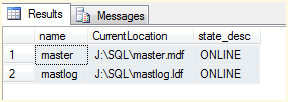
- Verify the file change for the master database by running the following query.
SELECT name, physical_name AS CurrentLocation, state_desc
FROM sys.master_files
WHERE database_id = DB_ID(‘master’);
GOVerify the file change

Enjoy! I hope this helps!
SQLSat86 Session Review: Andy Warren’s ‘Building a Professional Development Plan’
Before we begin, I must first admit that when I saw ‘Building a Professional Development Plan’ in the SQL Saturday 85 Schedule in Orlando back in September, I was not enthusiastic about attending this session as I thought it was more for consultants or for those looking to start their own business. Quite simply, I was thinking business plan and not individual plan. In hindsight, I wish I had attended this session back then, but I digress.
As most everyone knows, Andy Warren is the father of SQL Saturday and his status in the SQL community is legendary. With that being said I will now list the things that I learned from this session.
- Generally we do not like setting goals as there is an inherit risk of failure.
- The professional development plan, or PDP, is essentially your business plan as you are essentially a business with a plan.
- The PDP should be a pretty good mixture of growth items as well as technical items, such as:
- Formal Education
- Training
- Projects
- The PDP should have goals, milestones, as well as tasks necessary to accomplish these items.
- Questions you should ask yourself when developing the PDP include the following:
- Am I learning skills that only apply to my current job?
- What will be the next job that I search for?
- Will it be within my company?
- Am I being siloed into a narrow skill set in order to accomplish my existing responsibilities?
- If you are not being paid enough for your existing skill set then you are leaving money on the table.
- Where are you going and what do you want should be reflected in your PDP. What is the balance of the following items:
- More Money
- Stability
- Challenges
- Responsibility
- The following is a breakdown of the amount of time needed to reach different levels of success, how much are you willing to spend?
| 0-20 hours | No goal, no plan–Just work |
| 21-50 hours | Standard Maintenance |
| 51-100 hours | Slow growth, adding one skill |
| 101-200 hours | Serious investment |
| 200+ hours | Different focus / Hyper Growth |
- A Personal Development Plan should include the following:
- Networking, you should always try to meet three new people at each event or training.
- Writing / Communication skills
- Leadership / Management training
- Formal Education (or degree)
- Teaching / Presenting
- Professional Organizations / Events
- Blogging is important to your PDP for the following reasons:
- Networking
- It gives you practice writing
- It shows your level of consistency and follow through to future employers
- It shows that you participate in your profession
- You should keep up with new features for SQL Server. It is not possible to master all of the features but knowing what they are or do can be beneficial to your career.
I thoroughly enjoyed this session and will be developing my own Professional Development Plan before the end of the year. Thanks, Andy.
SQLSat86 Session Review: Adam Jorgensen’s “0 to SSAS”
The first session of the morning for me was Adam Jorgensen’s “0 to SSAS” presentation. Before this event, I had never had the privilege of attending one of Adam’s sessions and I do not work directly with SSAS, but his reputation as a good speaker enticed me to attend. Needless to say that I was not disappointed. Below are some random things that I learned from Adam:
- AS is the most powerful engine in the SQL Server line (designed to do table scans which would kill the DB engine)
- The Standard Edition for SQL Server is missing some of the AS functionality.
- AS uses BIDS aka Visual Studio with different project types
- AS works best with the STAR schema but might get the job done if your snowflake schema is not too diluted and you do not mind manually adding the dimensions.
- “Add related tables” will only find one level of relations which makes the STAR schema optimized for this.
- It was not said but I am guessing that the constellation schema would kill the engine 😉
SQLSat86 Session Review: Adam Jorgensen’s “0 to SSAS”
The first session of the morning for me was Adam Jorgensen’s “0 to SSAS” presentation. Before this event, I had never had the privilege of attending one of Adam’s sessions and I do not work directly with SSAS, but his reputation as a good speaker enticed me to attend. Needless to say that I was not disappointed. Below are some random things that I learned from Adam:
- AS is the most powerful engine in the SQL Server line (designed to do table scans which would kill the DB engine)
- The Standard Edition for SQL Server is missing some of the AS functionality.
- AS uses BIDS aka Visual Studio with different project types
- AS works best with the STAR schema but might get the job done if your snowflake schema is not too diluted and you do not mind manually adding the dimensions.
- “Add related tables” will only find one level of relations which makes the STAR schema optimized for this.
- It was not said but I am guessing that the constellation schema would kill the engine 😉
SQL Saturday #86: Tampa BI Edition

SQL Saturday #86 was held on November 7, 2011, at K-Force Technology in beautiful Ybor City hosted by Jose Chinchilla, President of the Tampa Bay BI User Group. This event was a great success for a little over a hundred attendees even though I did not win the iPad. In addition, I believe this was the first time that a SQL Saturday event was dedicated solely to the Business Intelligence platform.
This was my second SQL Saturday event and it was well worth the investment of my time and travel to attend. I am going to post separate blogs detailing some of the things either that I learned or that stood out for me. Stay tuned for those posts.
Let the Gator Growl!
Hello and Welcome to the Swampland!
Thanks for visiting my new blog. I have decided to create this blog in order to separate my personal blog from my professional blog as I become more involved in the online SQL Server community. With this blog, I will be covering SQL Server, VMWare, and Windows server topics as I traverse my professional career online so you can learn from my mistakes and my journey. Welcome to the Swampland!


 SQL Swampland