Monthly Archives: March 2012
Best Practicing, the Results Part Dos
This week, we have been talking about running the Microsoft Baseline Configuration Analyzer 2.01 with the SQL Server Best Practice Analyzer for 2008 R2. Today I want to talk about one of the errors that occurred on one of the new boxes I just stood up in a new cluster. You may encounter a prerequisite error stating that the user is not a member of the Administrators group on the remote machine or PowerShell remoting is not enabled on the remote server. This is easily remedied.
- Add the user as a member of the Administrators group, or
- Run Enable-PSRemoting in PoweShell with elevated privileges, AND
- Run winrm set winrm/config/winrs `@`{MaxShellsPerUser=`”10″`} in PowerShell with elevated privileges.
Once I made these changes the analyzer was able to proceed. The analyzer will give you these directions, but I figured if you are reading this beforehand you can make the changes proactively. Enjoy!
Best Practicing, the Results Part I
Yesterday, I showed you how to install the Best Practices Analyzer and use it through the Baseline Configuration Analyzer. Even after your servers are setup for best practices, it is good to run the BPA from time to time to look for changes, especially if you have more than one DBA working on your servers. Here is a great example of its use: we purchased a new piece of software that needed to setup its database during the install. No problem, we do this quite often. After the install, two databases were created. Everything looked fine on the surface.
Not satisfied with everything looking fine, I ran the BPA and got the following results:

That’s right, the vendor tried to sneak in the Auto Shrink option. Now I can quickly remedy this situation and sleep easy tonight knowing that my SQL Server is yet again unblemished, for the most part.
Enjoy!
Best Practicing? Here’s How!
Are you trying to conform your systems to Microsoft standard best practices? Have you used Microsoft’s tools for automating this?

The first item you will need is the Microsoft Baseline Configuration Analyzer 2.0 (download). It will help you to maintain optimal system configuration by analyzing against the predefined set of best practices which we will download next. The Microsoft SQL Server 2008 R2 Best Practices Analyzer (download) is a component that runs within the MBCA. In addition, you will need PowerShell v2.0 installed on the server. This server can run against other SQL Servers so it does not need to be installed on your SQL Server.
Open the Microsoft Baseline Configuration Analyser and select SQL Server 2008 R2 BPA from the drop down as shown here. However, the first time you run the MBCA, you will have to type in the host and instance information. As you can see from my screenshot, I have already run this program at least once and now I can simply click once and scan it again. You can also choose Enter Parameters to view this screen, as shown below. Here it will let you choose which specific 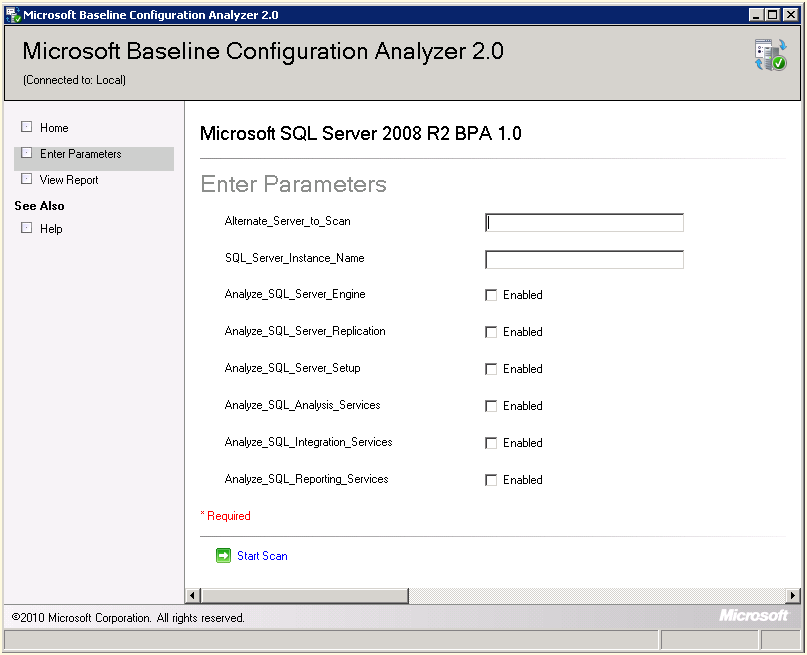 aspects of SQL Server that you would like to compare against the Best Practices for 2008 R2.
From this point you are ready to proceed with the scan and then view the results and recommendations presented after the analyzer compares against your particular SQL Server instance. Enjoy!
Sunday Funday
The usual installment of Sunday Funday will be brought to you by the letter F for fun. I encourage you to go have fun today. It is beautiful and sunny here in Florida. I went to a baseball game on Saturday with my daughter watching the number one ranked Florida Gators beat the Vanderbilt Commodores in Southeastern Conference play to continue their winning streak to 16 games.
Today, I am on a boat in the middle of the Gulf of Mexico fishing with my Mom and Dad and my family, so go enjoy your day today. Get out of the house and have a great day! Enjoy!
Saturday SQL Schoolhouse

SQL Schoolhouse!
Today’s installment of the Saturday SQL Schoolhouse is brought to you by our fine friends across the pond, SQL Bits. One day I would like to attend this conference as I hear that it is quite an event! With the conference aside, this is an excellent SQL Server educational resource as there are all the previous presentations from the past years’ conferences and many of them contain video presentations! Take advantage of this excellent educational opportunity!
Enjoy!
Off Topic Excitement, Technology Refresh!
Today is a big day harkening back to the first Star Wars action figure I received as a child. This is huge, I am stoked! My iPad 3 will be arriving today! Previously, I bought a droid tablet because, well let’s be honest here, it was cheap, only $200. Why bother with an iPad if I can get the same function for less money, right? Well I should have known that the reason I love my third iteration of iPhone is because they build a great product that works reliably.
The droid tablet, the Dell Streak, was to put it frankly, a piece of crap. It was awkward and unusable. If I left it off of the charger over night it would drain the battery and it did not recover well from full draining usually requiring me to find a paper clip to jam into the rest button. Eventually I attached the paper clip to the power cord as I was frequently pressing the reset button when I was unable to revive the streak from its REM sleep. After several months, I was able to download the Honeycomb flavor of the droid OS which made the screens a little more usable, but apps like twitter and Facebook were not as smooth and free-flowing as on my iPhone. It all worked out in the end as Amazon bought my tablet for $150 in their buy back program, largely because I held on to the box. At this point, it looks like a good idea to start doing that for all my toys in order to soften the upgrade costs. Ahh, technology refresh is now more affordable!
Enjoy!
March #Meme15 Assignment
After submitting last month’s #Meme15 blog post, brought to you by MVP Jason Strate (blog | twitter), I thought I would continue this blogging fun.
This month’s topic: How do you balance mixing family, friends, peers, and co-workers on Facebook?
Striking a balance on Facebook is a difficult task, at least for me. At my last position, many of my co-workers were neighbors and friends before they were co-workers. However, at my current position I knew no one prior to starting and sometimes letting people into your private life can be risky. Therefore, I guarded my private life as it takes time to trust co-workers and allow them into your inner circle. Facebook, for me, is more personal than my other social networking presences. With those, I am more comfortable communicating professionally in the social arena.
Once you are in my Facebook realm, there is still a bit of a balancing act. How should I interact with friends, family, high school classmates, college buddies, previous co-workers, and acquaintances from interactions with my children (parents of other kids that played football, baseball, basketball, softball, community theatre, and band with my children)? For example, I publish this SQL Server blog to my Facebook account and I know most of those friends are clueless about SQL Server, but I don’t always post technical blogs. Hopefully, they will get something out of my non-technical posts.
Also, I used to play games on Facebook, before I realized it was sucking my will to live: Farmville and Mafia Wars were consuming me and all of my time. If I am going to play games, I might as well use my PS3 for real gaming. I did find it interesting how upset people would get when you sent them game requests when they did not play that game and they were not capable of block them automatically.
At this point in my life, I pretty much only share pictures and great moments on Facebook in addition to my love of humor, Star Wars, SQL Server, and the Florida Gators. If you are one of the 368 friends on Facebook, you either enjoy my geekiness and sarcasm or you subscribe to the theory of keep you friends close and your enemies closer. In that case, I hope my geekiness will annoy those enemies. :-p
#Meme On! Enjoy!
My SQL Saturday #110 Recap
Now that SQL Saturday #110 in Tampa has come and gone and I have had a few days to reflect, I thought it would be a good time to briefly outline the event from my perspective. Below is the schedule of my sessions, if you like check out the slide decks and you too can experience my day.
- STOP! Consolidate and Listen! by Jorge Segarra (Blog | Twitter)
- SQL 2012 DMVs & Extended Events by Gareth Swanepoel (Blog | Twitter)
- TempDB Performance Troubleshooting and Optimizing by Eddie Wuerch (Twitter)
- The Dirty Business of Auditing by Brian Kelley (Blog | Twitter)
- Introduction to Execution Plans by Nathan Heaivilin
- Transaction Log Deep Dive by Kevin Boles (Twitter)
- Revenge: The SQL! by Rob Volk (Blog | Twitter)
Enjoy!
DBAs, MCMs and MVPs, Oh My!
In the #SQLFamily, there are several great MVPs and MCMs (Microsoft Most Valuable Professional and Microsoft Certified Masters, respectively) that are always available to help a SQL database administrator in need. Personally, I have not seen this kind of family atmosphere or camaraderie in any other area of technology that I have worked within. There is a great sense of pride in this family and a great sense of honor in helping other administrator and even developers. This is simply unheard of in today’s environment.
There is a flip side to this wonderful community and please do not get upset for what I am about to say as this community has been good to me and I appreciate everything they have done for me. With that being said, it can be intimidating for new people coming into our family. For example, on Friday night, I sat next two big names in the SQL Community, Andy Warren (Blog | Twitter) and Kevin Boles (Twitter), at dinner and quite simply I was awestruck. I should have relished at the chance to bask in their SQL knowledge.
How do you talk to guys of that level? I was intimidated, plain and simple. Can I talk to them on twitter, absolutely as I am not intimidated by their #SQLAwesomeness at that level. Maybe it is just me? Anyone else have trouble with this?
Enjoy!
Back In the Saddle Again
After spending a week at Paul Randal’s Immersion Event training, a week dedicated to standing up our new clusters, and then SQL Saturday this past weekend in Tampa, I am glad to get back to my SQL Servers. I missed them. Does anyone else ever feel like Gollum from Lord of the Rings, me neither. Now to get caught up on my various administrative duties that have queued up in the meantime. I am back in the saddle again!
I am going to be working on some blog posts for Best Practices this week after getting my new clusters all best practiced up! I am also working on some write ups for things I learned at SQL Saturday #110 in Tampa. I hope you enjoy!


 SQL Swampland