Blog Archives
Best Practicing, the Results Part I
Yesterday, I showed you how to install the Best Practices Analyzer and use it through the Baseline Configuration Analyzer. Even after your servers are setup for best practices, it is good to run the BPA from time to time to look for changes, especially if you have more than one DBA working on your servers. Here is a great example of its use: we purchased a new piece of software that needed to setup its database during the install. No problem, we do this quite often. After the install, two databases were created. Everything looked fine on the surface.
Not satisfied with everything looking fine, I ran the BPA and got the following results:

That’s right, the vendor tried to sneak in the Auto Shrink option. Now I can quickly remedy this situation and sleep easy tonight knowing that my SQL Server is yet again unblemished, for the most part.
Enjoy!
Best Practicing? Here’s How!
Are you trying to conform your systems to Microsoft standard best practices? Have you used Microsoft’s tools for automating this?

The first item you will need is the Microsoft Baseline Configuration Analyzer 2.0 (download). It will help you to maintain optimal system configuration by analyzing against the predefined set of best practices which we will download next. The Microsoft SQL Server 2008 R2 Best Practices Analyzer (download) is a component that runs within the MBCA. In addition, you will need PowerShell v2.0 installed on the server. This server can run against other SQL Servers so it does not need to be installed on your SQL Server.
Open the Microsoft Baseline Configuration Analyser and select SQL Server 2008 R2 BPA from the drop down as shown here. However, the first time you run the MBCA, you will have to type in the host and instance information. As you can see from my screenshot, I have already run this program at least once and now I can simply click once and scan it again. You can also choose Enter Parameters to view this screen, as shown below. Here it will let you choose which specific 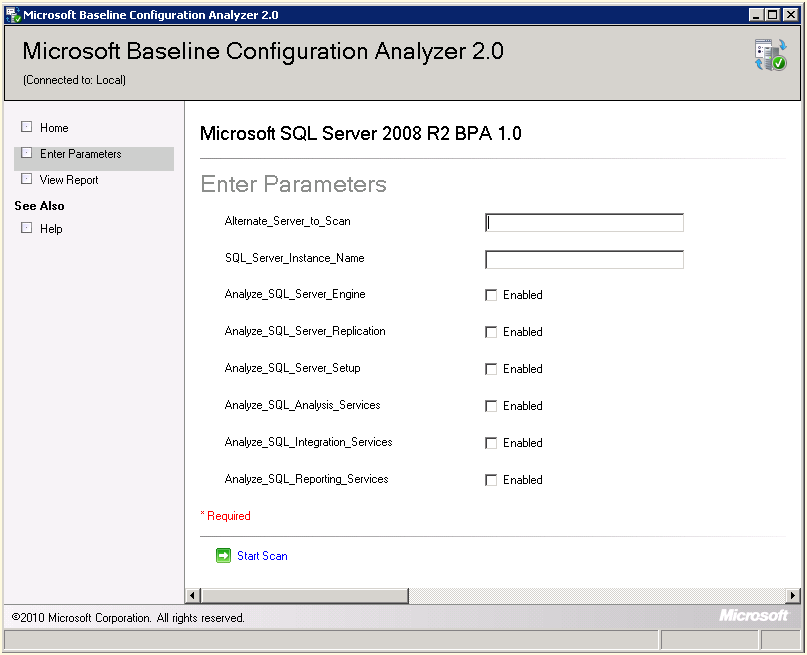 aspects of SQL Server that you would like to compare against the Best Practices for 2008 R2.
From this point you are ready to proceed with the scan and then view the results and recommendations presented after the analyzer compares against your particular SQL Server instance. Enjoy!
Back In the Saddle Again
After spending a week at Paul Randal’s Immersion Event training, a week dedicated to standing up our new clusters, and then SQL Saturday this past weekend in Tampa, I am glad to get back to my SQL Servers. I missed them. Does anyone else ever feel like Gollum from Lord of the Rings, me neither. Now to get caught up on my various administrative duties that have queued up in the meantime. I am back in the saddle again!
I am going to be working on some blog posts for Best Practices this week after getting my new clusters all best practiced up! I am also working on some write ups for things I learned at SQL Saturday #110 in Tampa. I hope you enjoy!
Optimizing TempDB Performance
Today I thought I would blog about TempDB performance. On one of my new servers, with 24 cores, I allocated eight TempDB files as that should be enough to distribute the load, reduce contention and improve performance. However, I forgot to restart the server after hours and it went on for a week and performance did not improve. It was at this point that I discovered that the files were not be proportionately filled. A simple Server restart resolved the issue and now it is running like a champ.
For more advice, check out Microsoft’s guidelines for Optimizing tempdb Performance.
Enjoy!
Backup and Recovery
On the drive in this morning, I was reflecting on what I needed to go over with my junior DBA today in his learning path (channeling Yoda). Backup and Recovery is so vitally important to what we do on a daily basis that I really need to drive that home to him. Therefore, I thought it would be a good topic to discuss and to blog about.
Then I remembered attending a Grant Fritchey (blog | twitter) webinar recently by Red Gate concerning this very same topic. If you missed the webinar, don’t worry as they put it up for all to see. There is really no need for me to reinvent the wheel here especially when Grant does it much better than I would. Thanks, Grant. Enjoy!
Clustered Nuts?
While looking at performance in some of my databases, I noticed there was a high number of FreeSpace scans going on. Aaargh! They are called clustered indexes, people use them! Performance, performance, performance!
In most cases it is best practices to start with a clustered index on every table created. There are rare instances when this is not the optimal setup, but for the large majority of standard databases put in a clustered index on each table. Your shooting yourself in the foot, people!
Enjoy!
Saturday SQL Schoolhouse

SQL Schoolhouse!
Today’s installment of the Saturday SQL Schoolhouse is brought to you by our fine friends over at SQLCat, the Microsoft SQL Server Customer Advisory Team. I thought their post on Storage Top Ten Best practices would be a great learning opportunity. Enjoy!
SQL Server Customer Advisory Team – SQL Server Best Practices.
Configuration Data Best Practice
After my recent Health and Risk Assessment visit from my Microsoft Premier Field Engineer, I learned some new and exciting SQL Server best practices and I thought that I would share them with you in this blog space. Our topic-o-choice today is all about backing up your configuration data. I must admit that I have not given this topic a second thought in the past and luckily it has never bitten me before. Microsoft defines configuration data as your sp_configure, SSIS packages and your replication topologies. These items are not usually backed up in your nightly backups and may not be contained in your system databases.
Microsoft recommends scripting your SQL Server configuration data to a file using SELECT * FROM sys.configurations anytime you make changes to your server. I would then include this in your disaster recovery walk-away bag or remote location destinations. Personally, I would recommend documenting these settings if at all possible in a Word document explaining why you have chosen the settings and if they relate to your department’s best practices so that when you get hit by a bus, your replacement DBA will understand the intricacies of your choices and not chalk them up to the ‘this guy was an idiot who knew not the ways of the force.’
In addition, if you are using replication then you should script out all of the components for your disaster recovery. It is also a good idea to back up your master and MSDB databases for the publisher, distributor and all of your subscribers. I personally have never done that, but Microsoft recommends it…so do IT! Enjoy!
Orphaned Windows Users….Annie?
A caveat when working with Windows domain users in your SQL Server is the possibility of orphaned users. When a user is removed from AD, they are not automatically removed from SQL Server. This is an orphaned user as far as SQL Server is concerned. Thus, no access will be provided to this account even if the AD account is recreated because it will have a new SID that will not match the existing item stored in SQL Server. You can run the sp_validatelogins stored procedure to display if any orphaned users are in the database.
To resolve this problem you will need to remove the user using DROP LOGIN ‘AD\Annie’. Then you will need to revoke the user’s server access using EXEC sp_revokelogin ‘AD\Annie’ to remove the user’s access to the server.
Enjoy!
Microsoft RAP, Not Just Clever Lyrics
We scheduled a Microsoft RAP, or Risk and Health Assessment Program, with our Premier Support representative to occur this week. This is an excellent program where a Microsoft Premier Field Engineer comes on site and assesses the risk and health of your SQL servers. We installed some new hardware and began a migration process moving from 2005 to 2008R2, so we thought this would be an excellent opportunity to assess our new environment as well to look at our best practices. Additionally, one of my goals for the assessment has been to put some weight behind my best practice ideas as well as some weight in order to change some practices by our developers. This is also an excellent opportunity for some of junior staff members to talk one on one with the field engineer to discuss some issues we have been working through as well as some of our pain points.
I will blog next week about some of our more interesting findings. Enjoy!


 SQL Swampland