Category Archives: Database Administration Tasks
Removing a Perfectly Good Cluster, Step One
Today we embark on a somewhat sad journey. A couple of days ago, I told you a story about a vendor and the miscommunication of specifications. Today the chickens have come home to roost. We must replace the SQL Server 2008R2 clusters with 2008 clusters. These were perfectly good clusters, fine tuned and ready to burst out of the starting gate and win the triple crown, well you understand what I mean. I’ve grown attached to these clusters as they were the first ones that I have ever personally built from the purchase order to production.
Today, we will uninstall both of the SQL Server nodes and then begin the reinstallation of the previous version. We will run the installer on the passive node first. In the installer go to the maintenance section and choose “Remove node from a SQL Server failover cluster.” After this is complete then we will go to the active node and go through the same process. Tomorrow we will look at the reinstallation of SQL Server 2008 SP3. Enjoy!
Disaster Recovery, Hurricane Season
June 1st marks the beginning of hurricane season on the east coast of the United States (May15th for the West Coast in case your curious). Working in Florida, I call this the dreaded time of year for many reasons and none of them have to do with being afraid that a hurricane is going to wipe out my house.
First of all, it is the dreaded ‘Hey let’s dust off the old DR plan and update it!’ time, that really should be kept up to date year round, but I digress. Most people don’t realize this but very few storms actually hit the state as opposed to the coastal Carolinas. Now we tend to worry if a storm makes it to the Gulf because those are unpredictable but generally head to Texas or New Orleans. However if it stay in the Atlantic they generally head right up the continental shelf and hit the Carolinas or go right on out to sea. Generally. Yes we did get a couple about eight years ago and I do remember Andrew especially since I went to High School in Homestead. Please don’t take this the wrong way as those were devastating but generally and statistically we see very little action.
If you have lived here for any time you start to see a pattern every June 1st. The first being what I like to call local news panic. I live somewhat between Orlando and Tampa and for years we would receive both sets of local channels in our cable package and we were unique in that regard. That is how I formed this theory as well as living in Jacksonville and South Florida while growing up. Every television station in Florida like to set in the panic about three weeks before a storm is actually anywhere near the state. They lead broadcasts with Tropical Depression Ed is located 1 million miles from the lesser Antilles and is showing a direct path through your living room. Then during the 11pm broadcast they show the panic and hysteria at the Home Depot where all the transplants panic and try to buy up all of the generators and plywood, water and batteries from Wal-Mart, and any other supplies they think they will need. PANIC! Little does everyone know that Miami is showing a direct path to their city, Tampa shows it either veering into the Gulf and then to Tampa or cutting clear across the state to them.
I’ve learned one thing about transplants, they are scared to death of Hurricanes which makes me wonder why they moved to Florida in the first place. Generally every ten or twenty years we get a storm which helps perpetrate the hysteria because everyone remembers or knows someone who was in Charlie or Andrew. Do not misunderstand this post, Hurricanes are bad, very bad and we usually escape the major damage but we always get tons of rain which causes flooding, lots of lightning (as we are the capital), and boat lot of tornadoes. There is damage, but it is not the mass hysteria that the media generates.
There is also a different phenomenon in the workplace: complacency. After you have been here for a while and realize this media panic, it leads to complacency as you can probably tell by my tone in this post. Generally this leads to DR plans not being updated and data not being accounted for in a disaster. UPDATE YOUR DISASTER RECOVERY PLAN! SAVE YOUR DATA! Enjoy!
Vendor Rant, Starting Over
We interrupt this regularly scheduled blog series to bring you a rant. Now wait don’t click away just yet. There is a lesson here somewhere, I hope.
To give you some background, we have a vendor, henceforth known as XYZ, to whom we have worked with for several years on their financial package. The package is currently in Oracle and it was decided that we could reduce costs by upgrading to the newest version of their package but migrating it to SQL Server to reduce our Oracle licenses which makes sound financial sense. Being a predominantly Oracle shop, I have been masterminding the demise of Oracle for the year that I have been here quietly chipping away.
This project has been in the planning stages for several months. During which time we order four identical super servers to be clustered into a production and development/acceptance active-passive clusters. I cannot deny that I indeed was excited about this project whole heartedly because of the hardware as well as the chance to reduce the Oracle footprint and to champion SQL Server as the preferred database. Plus, I have never built clusters from the ground up.
We took our time setting this servers up with Windows 2008 R2 Enterprise making sure that everything was well tuned. Then we setup our SQL Server 2008 R2 Enterprise clusters on all four boxes even bringing in our Microsoft Premier Field Engineer to ensure a successful migration ensuring that best practices were in effect. Most would view bringing in help as an insult to their pride, but I welcomed the learning opportunity and it helped with the learning of our green junior DBA who has no server or SQL experience. In addition, whenever I can be around our PFE, I am the eager padawan and she is the jedi master especially since she has an extensive Oracle background as well.
Fast forward and these machines are ready to go and all of the specifications were discussed and communicated several times through planning meetings. I even spoke with their DBAs during the install process to ensure that our settings were commensurate with the project. Now on Thursday of this week, the day before we are to begin migrating some of the Oracle data to the development box, I discover on one of the documents that the only version supported is SQL Server 2008 SP3 running on Windows 2008 R2 Enterprise. Hold the phone!
Rewind, notice I said we communicated several times that we were going to install SQL Server 2008 R2 Enterprise clusters on our new boxes and the vendor was compliant offering assistance if we needed it. THEY NEVER MENTIONED THAT THEY DID NOT SUPPORT R2. Now we have to uninstall R2 and install plain jane 2008 in effect putting us two versions behind and this project does not go live for another year after extensive testing. We even offered to be a beta testing site so that they could certify and say that they supported R2 since we have a year of testing ahead of us. DENIED! They were not interested whatsoever since none of the third-party tools such as BOXI support R2, according to them. Now I have to uninstall my beautiful creations and go backwards, this is progress. 😦
The moral of the story is to get the vendor to verify and sign off that the version you are installing is indeed supported before you install it. My supervisor and I thought by telling the vendor in the meetings that this would be evident. Next time we will force the issue before proceeding.
SQL Nexus, Perf Stats Report

2005 Perf Stats Report for 2008 Data
Continuing our SQL Nexus journey, I noticed another item with the Perf Stats reports. As I mentioned in a previous post, I imported SQL Server 2008 R2 data into SQL Nexus. However when I choose the “SQL Server 2008 Perf Stats” report I get the “The database doesn’t have necessary data to run this report” dialog box and when I choose the 2005 report, it opens.
Here is where it gets interesting, if I right-click on the report I can select the report parameters. The only parameter is version and the value is 2005. That’s understandable, so I manually tried to change it to 2008. Voila! The report refreshes and now the report title reflects the new value. This report gives you three choices: Blocking and Wait Statistics and Bottleneck Analysis, which both have their own reports on the menu, and Spin Lock Stats. It appears that changing the parameter only changes the title of the report. I think next week I will crack open these two reports to see why the 2008 data loads in the 2005 report and not in the proper one and what the parameter really does. Until then, enjoy your weekend!
SQL Nexus, Quirkiness Workaround

SQL Nexus Report Options
Yesterday, I wrote about the “Realtime – Server Status” report quirkiness where essentially the report does not work when you import SQL Server 2008 data and essentially it does not contain any information as to why it does not work, only a blank screen. Craig Purnell (Blog | Twitter) shortly thereafter sent me an updated report library file that works with 2008. That is exciting! I ran a diff on the two files and found that Craig updated two lines with the same change in order for this to work. The filename is “Realtime – Server Status.rdl” located in the Reports subfolder of your SQL Nexus installation folder. Below is the line that needs to be changed (remember to do it in both places):
Original line: SELECT @ts_now = cpu_ticks / CONVERT (float, cpu_ticks_in_ms) FROM sys.dm_os_sys_info
Updated Line: SELECT @ts_now = ms_ticks FROM sys.dm_os_sys_info
Thanks Craig, now I have results that look like the following:
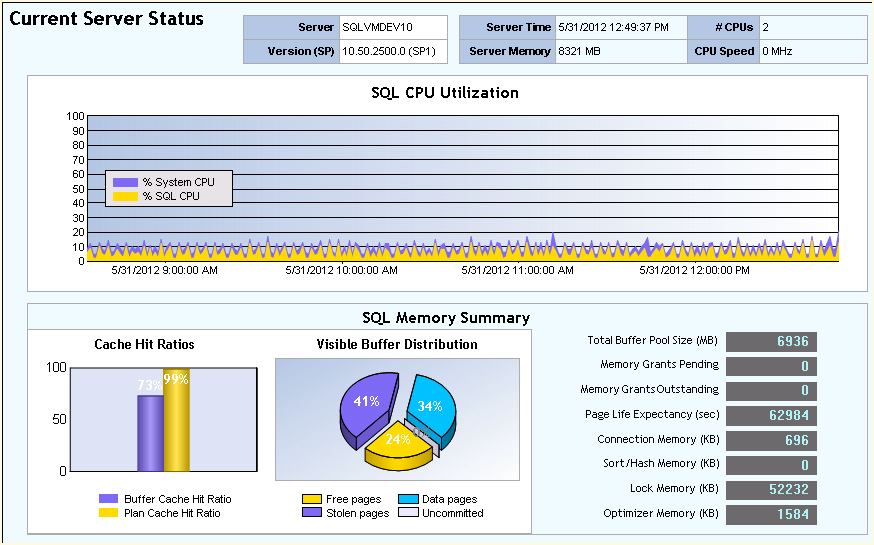
Realtime Server Status
SQL Nexus, Quirkiness Continued
SQL Nexus Report Options
As we continue our SQL Nexus journey, we continue to point out some quirkiness in the amazingly useful SQL Nexus tool. One of the items in the Reports section that I find quirky is the “Realtime – Server Status” report which on the surface sounds like an essential tool that I would rely heavily upon. However, when I select that report, the child screen goes blank and nothing happens.
Some of the other reports, such as the “SQL Server 2000 Perf Stats” report at least prompt you with a “The database doesn’t have necessary data to run this report” dialog box. That makes sense in this case because I am running from a SQL 2008 R2 source import. As we discovered early on in this blog series, the “ReadTrace_Main” report only works if your trace file import is successful. But the “Realtime – Server Status” report gives us nothing. No error, no suggestion, no data, nothing whatsoever.
After some careful research, actually I just loaded a SQL Server 2005 import, I discovered that this only works for 2005. Sadly, it appears to be a deprecated feature. This is a neat report that shows a dashboard reflecting the health of the server. This is quirky and there should at least be a message telling you that it will not work with 2008. Enjoy!
SQL Nexus, Adding Additional Collection Events
As we continue our SQL Nexus journey, I would like to point out something interesting that I learned from reading the SQL Nexus chapter in the race car book (aka Professional SQL Server 2008 Internals and Troubleshooting). The author, Christian Bolton, noted that the default Trace events that are collected when you run StartSQLDiagTrace2008R2.cmd from the performance scripts that we mentioned earlier in this series provide a good baseline for your monitoring activity. However, he noted added the following events in order to enable additional functionality necessary to compare execution plans and drill down to the statement level:
- EventType “Performance”, Event name “Show Plan Statistics”
- EventType “Stored Procedures”, Event name “SP:StmtCompleted”
- EventType “Stored Procedures”, Event name “SP:StmtStarting”
- EventType “TSQL”, Event name “SQL:StmtCompleted”
- EventType “TSQL”, Event name “SQL:StmtStarting”
In order to enable these simply edit the XML file, SQLDiagPerfStats_Trace2008.xml, changing the above items from false to true. After you collect these new events by running the CMD file, then import the collection into SQL Nexus and check out your new results. Enjoy!
SQL Nexus, More Quirkiness
As we continue our SQL Nexus journey, there are a few light things I would like to point out before the long holiday weekend. We will rejoin this journey probably next week after Memorial Day.
The first thing I noticed, after our debacle with the trace files not loading, was that several of the reports do not work as they should. After those were resolved, I noticed that some of the reports are not exactly what they state they are. For example, I connected to a SQL 2008 R2 box and imported the results from a detailed 2008 performance script (see previous posts) and yet when I click on the “SQL Server 2008 Perf Stats” report I get the error below. That is strange, what is stranger is that when I select the “SQL Server 2005 Perf Stats” report then I get results. I have talked with other DBAs who have experienced similar problems. Enjoy your holiday weekend!

Weird SQL Nexus Errors
SQL Nexus, Using RML Utilities
Continuing in our journey of SQL Nexus, today we will look at the RML Utilities that we installed prior to the installation of Nexus. While thinking about what to blog about this morning, I decided to search for some background information to integrate into our learning. Once a found an article from the SQL Customer Advisory Team (aka SQL CAT), I thought I would not reinvent the wheel and simply pass this information on to you. The article, Precision Performance for Microsoft SQL Server using RML Utilities 9.0, gives an excellent break down for the uses of the tool. Check it out and enjoy!
SQL Nexus, Read Trace Errors Resolved!
Last Monday we started our SQL Nexus journey together in order for me to refresh my knowledge of this awesome tool. Near the end of last week, the blog series was delayed due to an error with the ReadTrace and its corresponding report. Yesterday and again today, I am troubleshooting our attempt to resume our journey but with little hope for correcting the error. I have posted the error on CodePlex and am awaiting a response.
Yesterday, I referenced a “ReadTrace exit code: -2” error in the ReadTrace log file. I did find one page out there on SQL Server Central where Grant Fritchey (Twitter | Blog) had encountered the problem. After contacting, Grant he told me that the problem that he had was a simple one, he did not have the file and path name correct which corresponded with the file not found error higher up in the ReadTrace log. However, when cutting and pasting this file straight out of the log, the file opens. Strange indeed, but Grant got me thinking and thus reading through all of the files looking for a possible mistake in the scripts. I could not find any.
Keep in mind, this is with running the StartSQLDiagDetailed_Trace2008R2.cmd performance script that I outlined in one of the previous posts. This simply reference XML files that appear to only outline the performance indicators in which we want to monitor. It is in the MSDiagProcs.sql script that it identifies the trace files to load and run. In addition, none of the three scripts will load trace files into the import.
Here is a sample of what is called from the CMD scripts:
H:\PerfScripts\2008R2>”C:\Program Files\Microsoft SQL Server\100\Tools\Binn\SQLdiag.exe” /I “H:\PerfScripts\2008R2\SQLDiagPerfStats_Trace2008.XML” /O “H:\PerfScripts\2008R2\SQLDiagOutput” /P
However, attempts to run this manually through ReadTrace also failed with one of the trace files created by the performance script, such as:
H:\Program Files\Microsoft Corporation\RMLUtils>readtrace.exe -I”H:\PerfScripts\2008R2\SQLDiagOutput\SQLVMDEV10_SQLDIAG__sp_trace.trc” -o”C:\Users\crssqladmin\AppData\Local\Temp\2\RML” -SSQLVMDEV10 -dsqlnexus -E -T18 -f -H!PSSDIAG
However, playing with the file names yielded a different problem. When I renamed the file taking out the double underscore, ‘__’, thus resulting in SQLVMDEV10_SQLDIAGsp_trace.trc and SQLVMDEV10_SQLDIAGsp_trace_blk.trc, which seemed odd to me from the beginning, the ReadTrace load now indicated a permissions error. When I added my administrative account to these two trace files, the ReadTrace worked. Hmm, weird but interesting. I wonder now if the SQL Nexus import would load? See for yourself:

SQL Nexus Import Successful
Enjoy and I hope this helps if you encountered the same issue!


 SQL Swampland