Category Archives: Database Administration Tasks
Know Your ROLE!
In the famous words of The Rock “know your role and shut your mouth!” Well mainly we were going with “know your role.”
Do you know your SQL Server security roles?
A SQL Server role defines exactly what a user can and cannot do inside a database. It is also possible for multiple users be it AD users and groups or SQL Server users can share this role. Roles are similar to AD groups in Windows security except they only control security within databases.
Today we will discuss the fixed roles which are setup across the server instance and apply to all objects on the server. They are as follows:
- SysAdmin Role: This is the Mac Daddy of roles as it can perform any and all actions on the server.
- ServerAdmin Role: This role can change configuration options on the server. They can also shut down the server, choose them wisely.
- SetupAdmin Role: This role can manage linked servers, SQL Server startup options and tasks.
- SecurityAdmin Role: This role can only manage server security. They can also reset passwords saving you from the mundane task, if you have your own minions.
- ProcessAdmin Role: This role has the ability to kill processes running on the SQL Server aka SPID killer aka Die SPID die!
- DbCreator Role: This role can create, alter, drop and restore databases, which is pretty powerful just now Genie from Aladdin powerful.
- DiskAdmin Role: This role can manage the SQL Server disk files.
- BulkAdmin Role: This role can only run the bulk insert command (I have personally never seen used before).
- Public Role: Every user belongs to the public role by default and therefore you cannot change membership to this role. Keep in mind if you assign any permissions to this role it will apply across the entire instance.
There are several of these that I rarely use, but they are there if I need them. Like the Rock says “know your role!” Tomorrow we will discuss pre-defined database roles. Enjoy!
Oracle Conversion Update
The Oracle Conversion, day 14, continues and it is not as exciting as I envisioned. Oh, don’t get me wrong, the end result, Global Domination for SQL Server, will be the ends that justify the means. But until then, migrate data, check data, clean data, remigrate date, check data, clean data, time migration, repair migration process, check data, clean data, remigrate, ad nauseam. Rinse, lather, repeat.
Oh, this is not my first rodeo, I’ve converted many projects before but never have I converted Oracle before. Granted, the SQL Server Migration Assistant for Oracle has made life much easier but at the same time it has made life much more difficult.
It is a quirky tool that is very temperamental. We had to restart it before we did a successive migration or it would fail we are guessing because it possibly caches information from the previous migration process and the MSDN blog wasn’t much help. We also had to hit apply on every setting change or it would revert some of them back to the original value.
In addition, we would have to convert schema sometimes four or five times before it would synchronize them properly to SQL Server, saying that the SQL execution failed. That answer gives me a huge amount of troubleshooting possibilities. When it works, it was a great time saver but had we known the quirkiness we probably could have scripted it all out and saved a lot of headaches.
Doesn’t sound like a big deal?
Well when you have some big tables and it takes eight hours to convert the schema and you try synchronizing and it fails and you have to convert the schema again, you watch the progress bar for many hours. Oh yeah, I left out the fact that the vendor is responsible for the migration contractually, so I guess ultimately they should have scripted it out. Enjoy!
What’s In A Datetime Anyway?
Last week we talked about my Oracle migration to SQL Server and the vendor’s use of datetime over datetime2. Today, I thought I would discuss the differences between the two datatypes.
First of all, datetime2 is recommended by Microsoft as opposed to datetime as it provides a larger data range, a larger default fractional precision as well as the optionally defined user precision level. Datetime2 is also ANSI and ISO 8601 compliant, whereas datetime is not. Which would you use?
Example:
Datetime2: 2012-06-25 12:45:10.1234567
Datetime: 2012-06-25 12:45:10.123
Global Domination, SQL Server Style
For the last two weeks, I have been working with a vendor to migrate our financials from Oracle to SQL Server using SQL Server Migration Assistant. This has been a time-consuming process, which requires an extreme attention to detail as precious data hangs in the balance.
We have found numerous pieces of ‘bad data’ where either Oracle or the application allowed date such as 03/02/0007. These dates are allowed to migrate to SQL Server when using a datetime2 with precision 0, however the vendor requested to use datetime originally which ranges from 1/1/1753 to 12/31/9999, thus causing migration errors.
Here is the dilemma, do you modify data for financials that have closed to have clean data or leave data as is? The DBA in me says to clean the data and make everything pristine before you move it into my SQL Servers, however there are implications with financials and the department made the decision to import as is to ensure data was identical and unmodified. That I can certify, well the vendor will need to certify that as they have chosen the column type conversion fields that work with their application’s SQL Server version.
This conversion is a critical piece in my plan for global domination, well that is my plan to destroy our dependence on Oracle and move solely to SQL Server especially since we are a dot NET development shop. When this project is successful and users see better performance then we will be able to migrate other databases as well and we will see better performance! Enjoy.
Weird DBMail Error in 2008
Found a weirdness this morning that I thought I would share with you. I have recently setup up two new SQL Server 2008 clusters and setup the database mail yesterday so that I can receive a nightly backup report, which is much easier than 50-100 individual emails per server. The database mail worked on the send test email, but was not sending out for jobs.
I talked to our exchange guy to make sure there was nothing on that end preventing the flow. I reviewed the settings and review the SQL agent job. Nothing jumped out at me. The job history showed SQLSTATE 42000, ERROR 14607.
Upon bingling the error code, I found the error to mean incorrect profile name. I named the profile, so now SQL Server is judging my naming convention?
Wait, I scripted out the job from another server, but I changed the names in the script. I rechecked the profile on the source server and it was named “<server name> Mail”. However my profile on the new server was simply named after the server name. Once I changed the name by deleting the profile and creating a new one, the job worked successfully. Attention to details! I hope this helps someone, enjoy!
Legal Apocalypse, Administration Insanity
Does anyone read the EULA (End-user license agreement) during software installations? I know I do not, who can? Lawyers.
We were just informed today that before installing any software, updates, or patches onto our desktops or servers we must have approval from our legal department. So on patch Tuesday, I may have to wait a few weeks to get approval if the patch has a EULA thereby putting my servers in jeopardy of the legal department?
We have also heard that they would notify us of any requested changes to the EULA. Now that is funny! Let’s review this, an organization with around 600 employees dictating to Microsoft the wording in THEIR EULA. Is today April 1st? No, well then this will be interesting to say the least. I wonder if me commenting on this might bring legal action upon me?
The IT department has just been run aground by red tape. Enjoy!
CodePlex Tool: SQL Server 2008 Extended Events SSMS Addin
Yesterday we discussed traversing the CodePlex tool offerings for SQL Server. Our first installment is the SQL Server 2008 Extended Events SSMS Addin written by MVP/MCM Jonathan Kehayias (blog|twitter) of SQLskills.com.
The install was a simple GUI installer and after an SSMS restart, I could see the nice little GUI as seen in the image below. This is great idea because there is currently not an extended events interface in SQL Server Management Studio.
Personally, I haven’t worked very much with extended events, but I would like to learn more. With that being said, I am not sure if the tool works or not because I really do not know what I am looking for. Does this image mean I have an error? When I click on the event , it does nothing which leads me to believe that I do not have an error. I do see where I can edit the event session “system_health” but I am not sure if the items in the list are always there or only there when the event fires? Jonathan is an MCM and is much smarter than me in regards to SQL Server, so maybe someone else can comment on this tool? Maybe we can convince Jonathan to create some documentation. Enjoy!

Extended Events SSMS GUI
CodePlex Tool Hunting
This morning I was contemplating what new project to tackle for my blog. I started thinking about tackling PAL (Performance Analysis of Logs) and my recent blog on SQL Nexus. That got me thinking about CodePlex, Microsoft’s open source directory where those two utilities are located. What other great tools are out there for SQL Server? This Project Directory indicates there are 328 SQL Server related projects on CodePlex. Holy special toolbelt, Batman that is a lot of utilities.
I will spend the next week or so exploring some of these tools. Stay tuned, same bat time, same bat channel.
Green? If You Only Knew the Power of the Dark Side!
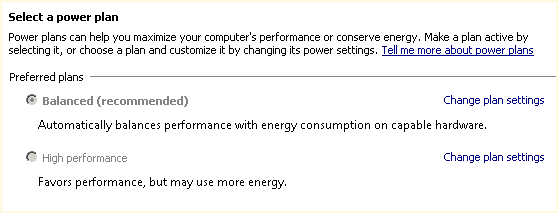
Default Server Power Plan
Continuing my blog series from SQL Saturday #132, I wanted to review one piece of good advice I received from the pre-conference training on Friday prior to the event. The pre-con titled “Demystifying Database Administration Best Practices” was presented by Microsoft Certified Masters Robert Davis (twitter|blog) and Argenis Fernandez (twitter|blog).
The default power setting for a new server is balanced as shown in the image above. This is great when you are trying to achieve a green workplace. But did you realize that you purchased hardware and now you are not using it to its full power? Why would you purchase a powerful server and then not use the server to its full capacity? Why not just buy a less powerful server if that is the goal?
Want to see the difference in the balance power plan and the high performance? Download the freeware CPU-Z utility from CPUID. This is a great utility for the administrator for more reasons than just this one as it gives realtime analysis for your CPU, memory, and graphics.
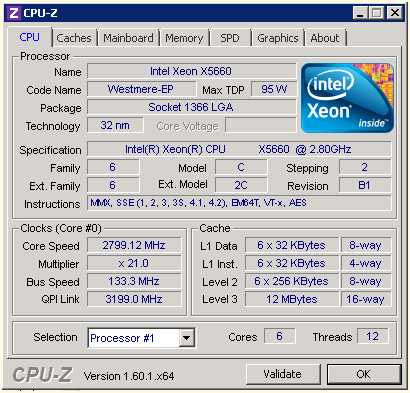
CPU Performance with Balance Power Plan

Check your servers, you may be running short on some power. Stay tuned for more items in our next installment. Enjoy!


 SQL Swampland