Monthly Archives: June 2012
Legal Apocalypse, Administration Insanity
Does anyone read the EULA (End-user license agreement) during software installations? I know I do not, who can? Lawyers.
We were just informed today that before installing any software, updates, or patches onto our desktops or servers we must have approval from our legal department. So on patch Tuesday, I may have to wait a few weeks to get approval if the patch has a EULA thereby putting my servers in jeopardy of the legal department?
We have also heard that they would notify us of any requested changes to the EULA. Now that is funny! Let’s review this, an organization with around 600 employees dictating to Microsoft the wording in THEIR EULA. Is today April 1st? No, well then this will be interesting to say the least. I wonder if me commenting on this might bring legal action upon me?
The IT department has just been run aground by red tape. Enjoy!
CodePlex Tool: SQL Server 2008 Extended Events SSMS Addin
Yesterday we discussed traversing the CodePlex tool offerings for SQL Server. Our first installment is the SQL Server 2008 Extended Events SSMS Addin written by MVP/MCM Jonathan Kehayias (blog|twitter) of SQLskills.com.
The install was a simple GUI installer and after an SSMS restart, I could see the nice little GUI as seen in the image below. This is great idea because there is currently not an extended events interface in SQL Server Management Studio.
Personally, I haven’t worked very much with extended events, but I would like to learn more. With that being said, I am not sure if the tool works or not because I really do not know what I am looking for. Does this image mean I have an error? When I click on the event , it does nothing which leads me to believe that I do not have an error. I do see where I can edit the event session “system_health” but I am not sure if the items in the list are always there or only there when the event fires? Jonathan is an MCM and is much smarter than me in regards to SQL Server, so maybe someone else can comment on this tool? Maybe we can convince Jonathan to create some documentation. Enjoy!

Extended Events SSMS GUI
CodePlex Tool Hunting
This morning I was contemplating what new project to tackle for my blog. I started thinking about tackling PAL (Performance Analysis of Logs) and my recent blog on SQL Nexus. That got me thinking about CodePlex, Microsoft’s open source directory where those two utilities are located. What other great tools are out there for SQL Server? This Project Directory indicates there are 328 SQL Server related projects on CodePlex. Holy special toolbelt, Batman that is a lot of utilities.
I will spend the next week or so exploring some of these tools. Stay tuned, same bat time, same bat channel.
Father’s Day
I want to wish all of the father’s out there a wonderful Father’s Day. I spent the day with my Dad today, not that I needed a special day but it is important to me to let him know that I appreciate everything he did for me. Enjoy.
Father’s Day Weekend
Today my family cooked and prepared a nice ham dinner for my wife’s father and mother. Or should I more appropriately say that my wife prepared the meal and I used my excellent meat cutting skills to slice the baked ham. It is days like today that we live for, sharing stories, a good meal, and love. I enjoy SQL Server and technology, but I love my family. They are priority number one. They are the reason that we go to work everyday.
I appreciate you reading this blog, but get off the computer and spend time with your family.
Final Thought from SQL Saturday Pensacola Pre-Con
For my final blog about SQL Saturday #132, I wanted to leave you with one all-encompassing piece of advice that I received from the pre-conference training on Friday prior to the event. The pre-con titled “Demystifying Database Administration Best Practices” was presented by Microsoft Certified Masters Robert Davis (twitter|blog) and Argenis Fernandez (twitter|blog).
Of course, I will preface this advice with the fact that I am passionate about Best Practices and I also love using the Best Practice Analyzer from Microsoft to detect new violations of best practices. It is great to run on an instance when I am in a hurry and do not have time to go through a check list. I simply want to see if any new changes have been made since the last time I ran the tool also known as has anyone changed anything on the server without my knowledge. With that being said, I give you the advice.
“Do not always rely or trust the information from Best Practice Analyzer”
I do not remember if Robert or Argenis said this pearl and it really doesn’t matter because it is great advice for you and me. Do not mistake all of my previous posts on the BPA as gospel. It is a great tool, but it is an automated solution. It simply cannot know all of the specifics of your server, applications and environments. Hopefully you do!
This is the reason that you can choose to disregard some items so that you never see them again. I personally do not like doing that because if something changes in my department then I forgot all about the warning because I disregarded. If I see it is a warning then I know it is still there but there is nothing I can do about it.
Mixed mode authentication is a great example. We have to run it on some servers because of vendor applications but we are not happy about it. This will trigger a warning every time, but I do not disregard it because at some point that may change.
Have a great weekend and enjoy!
Green? If You Only Knew the Power of the Dark Side!
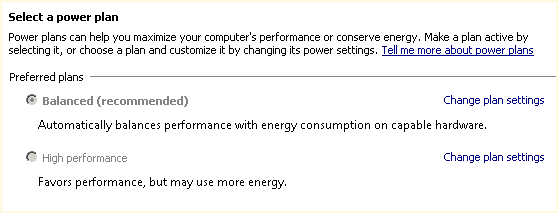
Default Server Power Plan
Continuing my blog series from SQL Saturday #132, I wanted to review one piece of good advice I received from the pre-conference training on Friday prior to the event. The pre-con titled “Demystifying Database Administration Best Practices” was presented by Microsoft Certified Masters Robert Davis (twitter|blog) and Argenis Fernandez (twitter|blog).
The default power setting for a new server is balanced as shown in the image above. This is great when you are trying to achieve a green workplace. But did you realize that you purchased hardware and now you are not using it to its full power? Why would you purchase a powerful server and then not use the server to its full capacity? Why not just buy a less powerful server if that is the goal?
Want to see the difference in the balance power plan and the high performance? Download the freeware CPU-Z utility from CPUID. This is a great utility for the administrator for more reasons than just this one as it gives realtime analysis for your CPU, memory, and graphics.
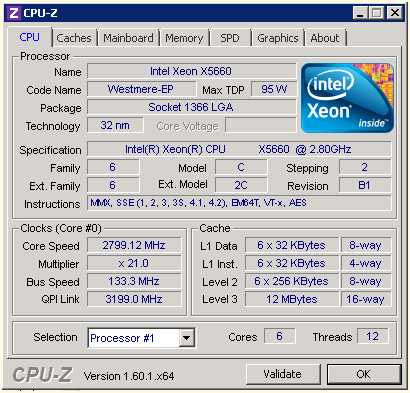
CPU Performance with Balance Power Plan

Check your servers, you may be running short on some power. Stay tuned for more items in our next installment. Enjoy!


 SQL Swampland