Category Archives: Database Administration Tasks
Sunday Funday
Today’s installment of Sunday Funday brings you some fun with T-SQL by Nick Jacobsen, the classic 99 Bottles of Beer T-SQL style. Enjoy!
Using the Right Tool
My week has been spent deep diving with the OpNet AppInternals Xpert and AppResponse console to learn some more valuable troubleshooting skills for our servers and applications that we administer including SQL Server and Oracle.
Using OpNet, I have been able to resolve three major headaches for my team this week working with their engineer. I am reminded of the simple fact that sometimes the ability to do your job well consists of having the proper tools to perform the job. With the cost of these tools sometimes you have to be able to justify the need but this one pays for itself many times over and that says a lot because it is pricey.
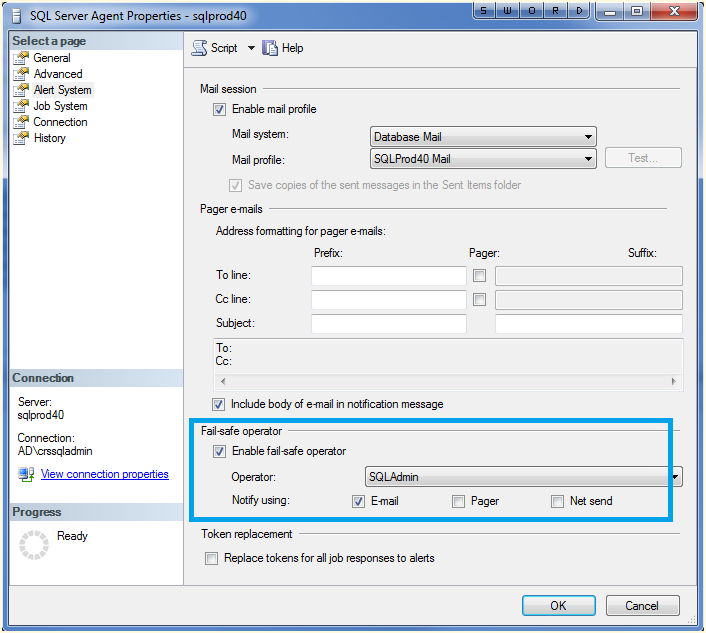
Fail-Safe Operator
Everyone needs a backup plan including the SQL Server notifications. If something goes awry with the notifications or the msdb database is unreachable, then the fail-safe operator will ensure that mail is delivered.
Select properties on the SQL Server agent (from the object explorer) in order to enable it for your instance. Enjoy!
Beginning OpNet Monitoring
Today’s blog will be brief as I am in the middle of a weeklong process of learning the OpNet AppInternals xPert Monitoring and Transaction Trace Warehouse. I am excited to see how well this tool can interact with our SQL Servers as well as Oracle servers, dotNet application servers, and our Java based enterprise content management system.
We are in the configuration side today with the rest of the week set for troubleshooting various issues we have in our production environment. I will keep you posted as I learn this product. So far, it seems pretty powerful. Enjoy!
Outlook Rules Are Your Friend
 If you are like me, you receive quite a bit of automated e-mails from all of your SQL Server jobs and maintenance plans. This can take a fair amount of time to read these e-mails daily. Until now!
Outlook rules and alerts are a great way to manage this workload. First of all, and most importantly, use a unique description in the Notify Operator Task for maintenance plan notifications, such as Figure 1. Be consistent! Use this same string in all of your backup tasks in your maintenance plans.

Figure 1
Then create a rule in Outlook (Tools -> Rules and Alerts -> New Rule) to handle these messages. Personally, I set them to move to another folder to keep them organized, look for specific words in the body (the phrase we put consistently in our notification tasks), and make sure they come from the e-mail account that I setup to alert me from all of my servers (as shown in Figure 2).

Figure 2
From here, let the fun begin as I then do the following (see Figure 3):
- Mark them as high importance
- Flag the message for follow-up today
- Move it to the specified folder (I know we did this on the last step, but it is highlighted on this step as well, silly Outlook)
- Display a specific message, Database Backup has FAILED, in the New Item Alert window to ensure that I see it as it happens (granted most jobs are at night, but it will be there waiting for me in the morning)
- Display a Desktop Alert (can you tell that this is a big deal?)

Figure 3
From here you can name the rule and finish the task. I also like to setup a rule for successful jobs that searches for a successful string that I have designated, but in that case I mark the e-mail as read and move it to the folder in case I need to search for it later.
For SQL Server Agent jobs, you have to do things just a little bit different since you cannot set a custom string for the alert message. In that case, search for “STATUS: Succeeded” (or failed, if that is the case) in the body of the e-mail and setup your other options in the same manner.
Outlook Rules are your friend, use them to be more productive. Enjoy!
Cooperation is Key
We have a morning “production control” meeting daily where key people report on the status of their systems as well as announcing approved change management items. Most days this is an exercise in repetition but it is necessary in order for administrators to announce changes to their systems that might affect other connected systems. For me, bringing down one of my SQL Servers can have a far out reaching effect upon many other systems.
For example, we have one particular server that houses all of the databases for our internal IT systems, such as VMWare Virtual Center and Citrix and a few smaller ones such as Blackberry Enterprise Server. This is a beefy server to power our infrastructure, however it is a major hassle every time I need to do some maintenance on it. Yes we have maintenance windows. However, for many of these systems the particular admin has to intervene before I can take their particular database offline. The usual cry is that “hey you cannot take that down on that day because I have X job running” where I say “no problem, how about tomorrow?” Then someone else chimes in with “no good, I have this process that runs on that day.”
My solution? Setup a meeting and coordinate the maintenance, which will happen come hell or high water. Cooperation is key. The database server must be patched and maintained, but without cooperation many other systems will suffer.
Enjoy!
SQL Cluster Failover Issues
Today’s topic is ‘oh crap, I manually failed over my SQL Server cluster during a lunch-time scheduled maintenance window and SQL Server and SQL Server Agent did not come back online.’ The key words in their being OH CRAP!
Looking at the ‘oh so informative cluster events’ I see the following:
The Cluster service failed to bring clustered service or application ‘SQL Server (MSSQLSERVER)’ completely online or offline. One or more resources may be in a failed state. This may impact the availability of the clustered service or application.
That did not help, let’s move onto the Windows Event Viewer. It gave us: “The specified account’s password has expired.” Wait a minute! These are service accounts created by our active directory administrator that are supposed to never expire. Hmmm, I better investigate further. I look at a big group of my SQL Server service accounts and noticed about half of them are set this way. When I questioned the AD administrator, he indicated that he was training a new person and he must have done the half that was incorrect. Problem solved. Thus, it is a good idea to always check to make sure that your accounts are setup properly before you use them in SQL Server.
Enjoy!
Getting to Know sp_helpuser
 The stored procedure, sp_helpuser, is useful in showing various information about the users such as login name, default database, default schema and the SID. You can also see if a user name is aliased. I hope you find this useful. Enjoy!
Saving Time with SQL Server Migration Assistant for Oracle
After using the SQL Server Migration Assistant for Oracle on a current project to migrate an Oracle database to SQL Server, I have learned a couple of little tricks that I would like to pass on to you. These are mainly time savers so hopefully they will make you more productive in your project.
The first problem I noticed is that there was no easy way to copy projects nor was there a way to save a project file as another name, which would have allowed me to copy the project. Why would I want to copy a project? There are many settings such as column type mappings that will stay the same for my project and are very time-consuming to enter, if you are modifying the defaults. In my migration, I want to do many iterations in my development and acceptance environments with different SQL Server database names such as Round1, Round2, or Round3 and then use Red Gate Compare and Data Compare to verify that all of the schema and data from the migration are consistent in my migration. This gives me a warm and fuzzy feeling before I turn over the data to the testers.
However with each iteration, I must create a new project manually. Why? Because SSMA does not refresh to recognize new databases in the existing projects. That is very annoying. It only shows what is there at the time the project is created. Even if you reconnect to the SQL Server, it does not refresh.
If you know ahead of time that you will do many iterations, you could however create several databases before starting with the SSMA and then copy the project folder from the first project that you create manually. You must then rename the folder to the new project name and the corresponding project file (with an o2ssproj file extension) contained within the project folder. This would allow you to simply switch to the new database. You must also keep in mind that you need to double-click on the Oracle schema and make sure the target schema is selected as your new database. This will not happen automagically as you choose a new database name in the SQL Server metadata explorer.
Another option is to create new projects as you create the databases and then copy in the object-container.mappings and/or project-container.mappings files from the first project folder into the new project folder. This will allow you copy those settings into the new project and save you some time. I hope you find this useful. Enjoy.
Duplicate Columns
Yesterday I needed to find several tables in a database that contained a certain column name. It is usually easy if you have only a few tables but this database has almost 2000 tables. I needed to use some T-SQL skills.
I consulted with the SQLHelp hash tag on twitter because it has been a while since I did this last and I knew someone there would remember how to do it quicker than I could. Robert Davis, MCM extraordinaire (blog |twitter) had the following line:
SELECT object_name(object_ID) FROM sys.columns WHERE NAME = ‘<column name>’
While Bill Fellows (blog|twitter) had a different approach:
SELECT TABLE_NAME FROMinformation_schema.COLUMNS ISC WHERE isc.COLUMN_NAME =‘<column name>’
Both worked very well and here they are here for you and for me when I need to remember how I did it. Enjoy!


 SQL Swampland